

SKILL.md entrypoint that the agent loads on demand based on context.
Developing Skills (Branch Workflow)
You can test skill changes on a branch before merging tomain by pinning a notebook to a specific latch-skills branch.
1
Create a branch
Push a branch to the
latch-skills repository with your changes (new or modified skills).2
Set the skills branch
In Edit mode, open Runtime Settings (via the runtime dropdown in the notebook top bar) and select your branch from the Skills Branch picker.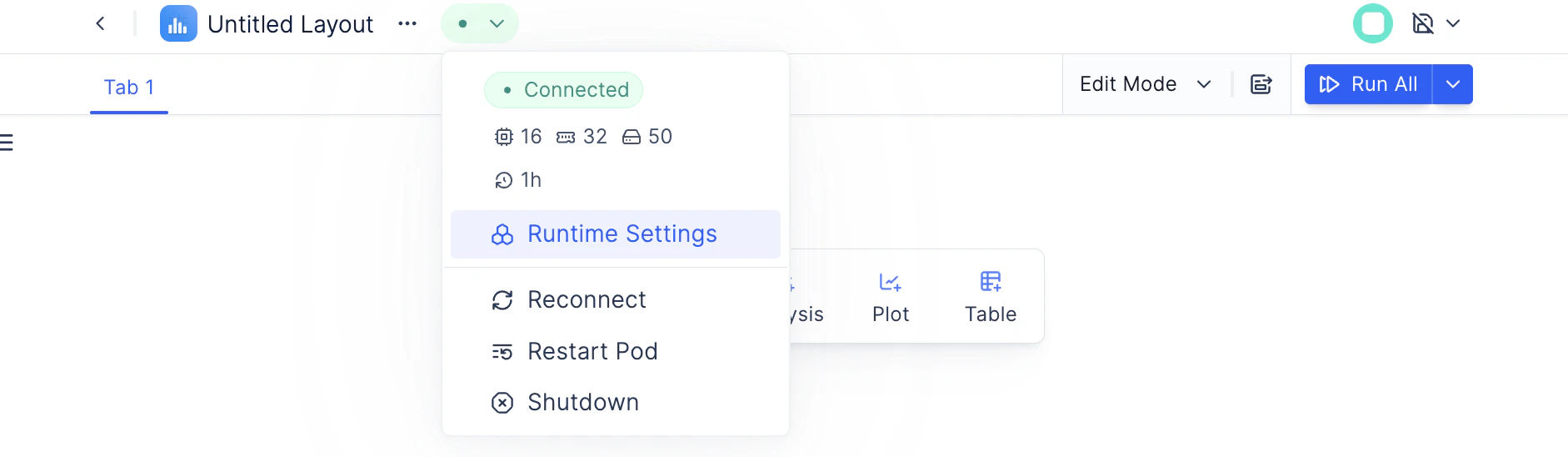
3
Restart the pod
Restart the notebook runtime. On startup, the agent clones
latch-skills at your chosen branch instead of main.4
Test
Send a prompt that should trigger your skill. Verify the agent loads and uses it correctly.
5
Merge and reset
Once verified, merge your branch into
main. Clear the Skills Branch setting (or leave it as default) so the notebook tracks main going forward.The skills branch setting is per-notebook and persists across restarts. On every restart, the runtime fetches the latest commit on the configured branch, so you can push updates and restart without changing the setting.
Built-in Skills
Every agent session includes Latch’s public skill set fromlatch-skills. These are cloned automatically at startup — no registration required. By default, the main branch is used. See Developing Skills above to test on a different branch.
Platform Skills
Core Latch Plots APIs and patterns:Technology Skills
Provider-specific analysis workflows and best practices:Custom Skills
Organization admins can register private GitHub repositories containing custom skills that get loaded into agent runtimes across all workspaces in the organization.Skill Repository Structure
A skill repository must follow this structure:Rules
- Each top-level directory containing a
SKILL.mdfile becomes a skill - Only one level of skill directories — no nesting skills inside skills
README.mdat the repo root is for GitHub — the agent does not load it- Skill directory names must be unique across all registered repos in an organization. If two repos define the same skill name, syncing will fail.
Writing a SKILL.md
Every skill needs aSKILL.md file with YAML frontmatter and markdown instructions:
Required Fields
Optional Fields
Supporting Files
KeepSKILL.md focused and under 500 lines. Move detailed reference material to separate files and link them from SKILL.md:
SKILL.md.
Merging Multiple Repositories
When multiple repositories are registered with the same target path (the default.claude/skills/), their skill directories are merged side by side:
spatial-analysis/ skill, syncing will fail and the conflict will be reported in Organization Settings → Agent Skills.
Registering a Repository
1
Create a GitHub Personal Access Token
Generate a GitHub PAT with repo scope so the agent runtime can clone private repositories.
2
Connect your PAT
Go to Organization Settings → Agent Skills → GitHub Authentication and enter your GitHub username and token.
3
Add a repository
Click Add Repository and provide:
- Display Name: A human-readable label (e.g., “Our Lab Skills”)
- Repository URL: The HTTPS clone URL (e.g.,
https://github.com/my-org/agent-skills.git) - Branch: The branch to track (defaults to
main) - Target Path: Where to mount in the runtime (defaults to
.claude/skills)
4
Verify
When a new workspace agent session starts, the registered repositories are cloned into the runtime. The agent discovers all skills automatically.
How Skills Are Loaded
When an agent runtime starts in a workspace belonging to your organization:- All registered repositories are cloned using the org’s GitHub PAT
- Skill directory names are checked for uniqueness — conflicts block the sync
- The agent discovers
SKILL.mdfiles and reads theirdescriptionfields - During a session, the agent automatically loads a skill when your request matches its description