

Latch Agent operates within Latch Plots, where each notebook is backed by a dedicated virtual machine. Understanding how the notebook runtime works helps you manage agent sessions effectively.
Notebook Runtime
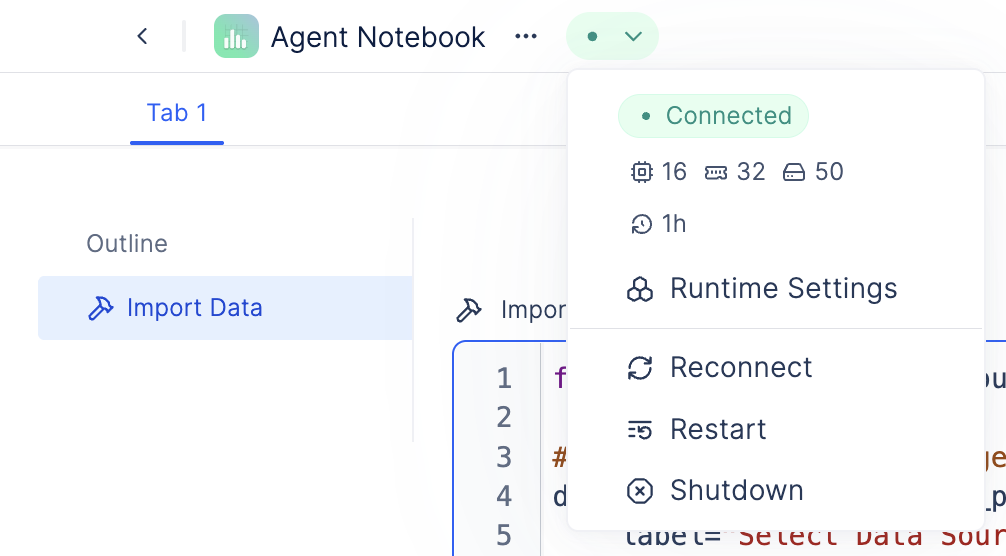
Latch Agent runs within a Latch Plots notebook runtime. Each notebook is backed by a dedicated virtual machine with a Python kernel, compute resources (CPU, GPU, RAM), and theplots-faas conda environment. The agent is only available when the notebook is in the “Connected” state.
Notebook Statuses and Agent Availability
When you create or open a notebook, it transitions through these states:- Creating Runtime / Layout Connecting / Initializing: The agent is not available during these startup phases. Initialization automatically executes all cells, which can take several minutes for complex notebooks.
- Connected: The agent is fully operational and can interact with the notebook, execute code, and manipulate cells.
- Dormant: The notebook has shut down. In-memory variables and session state are cleared, but files and installed packages persist on disk. The agent is unavailable until the notebook restarts and completes initialization.
By default, notebooks automatically shut down after 1 hour of inactivity.
Session Persistence
What persists: Code cells, files on disk, and installed packages. What doesn’t persist: In-memory variables, functions, and loaded data are cleared when the notebook shuts down. On restart, autorunning re-executes all cells, which recreates these variables.Before ending a session and shutting down the notebook, save important data to disk or upload to Latch Data. Ask the agent to help save data if needed.
Dependencies
The agent runs in theplots-faas conda environment and can automatically install custom dependencies as needed during analysis. Installed packages persist on disk across sessions, so they’re available in future sessions without reinstallation.
Best Practices
- Check notebook status: If the agent seems unresponsive, verify the notebook is in the “Connected” state. It may be initializing or dormant
- Plan for startup time: Opening a dormant notebook requires waiting for initialization (several minutes for complex notebooks) before the agent is ready
- Let the agent handle dependencies: The agent automatically installs required packages; manually installing everything upfront isn’t necessary
- Save important data: In-memory variables are cleared on shutdown, so explicitly save critical outputs to disk
- Restart strategically: Restart if memory issues occur, but expect temporary agent unavailability during reinitialization