> ## Documentation Index
> Fetch the complete documentation index at: https://wiki.latch.bio/llms.txt
> Use this file to discover all available pages before exploring further.
# Interval Trigger
This document is a work in progress and is subject to change.
We will walk through the process of creating an [automation](/workflows/sdk/automation/overview) using an `Interval` trigger type on Latch that will run an automation workflow hourly. We assume that you understand how to write and register [Workflows](/workflows/sdk/python/what-is-a-workflow) on Latch.
**Terms:**
* *Automation Workflow*: workflow which will be called by automation. This is the workflow we create in [step 1](#1-create-the-automation-workflow) of this tutorial.
## 1: Create the Automation Workflow
Below is a simple workflow example which creates folder `output` with a file locally and pushes it to Latch Data.
1. Initialize a new workflow using `latch init automation-wf`.
2. Replace `__init__.py` and `task.py` with the following sample code.
```python theme={null}
# __init__.py
from wf.task import task
from latch.resources.workflow import workflow
from latch.types.directory import LatchDir, LatchOutputDir
from latch.types.file import LatchFile
from latch.types.metadata import LatchAuthor, LatchMetadata, LatchParameter
metadata = LatchMetadata(
display_name="Interval Automation Workflow",
author=LatchAuthor(
name="Your Name",
),
# Note: parameters have to be empty for this workflow to be successfully run by the automation
parameters={},
)
@workflow(metadata)
def workflow() -> None:
task()
```
```python theme={null}
# task.py
import os
from urllib.parse import urljoin
from latch import message
from latch.resources.tasks import small_task
from latch.types.directory import LatchDir, LatchFile, LatchOutputDir
@small_task
def task() -> LatchDir:
os.mkdir("output")
with open("output/hello_world.txt", 'w') as file:
file.write("Hello World!")
return LatchDir("output", "LDATA PATH FOR THE DIRECTORY")
```
3. Register the sample target workflow with Latch using
```shell-session theme={null}
$ latch register --yes automation-wf
```
5. Test the workflow by running it on Latch
## 2. Create Automation
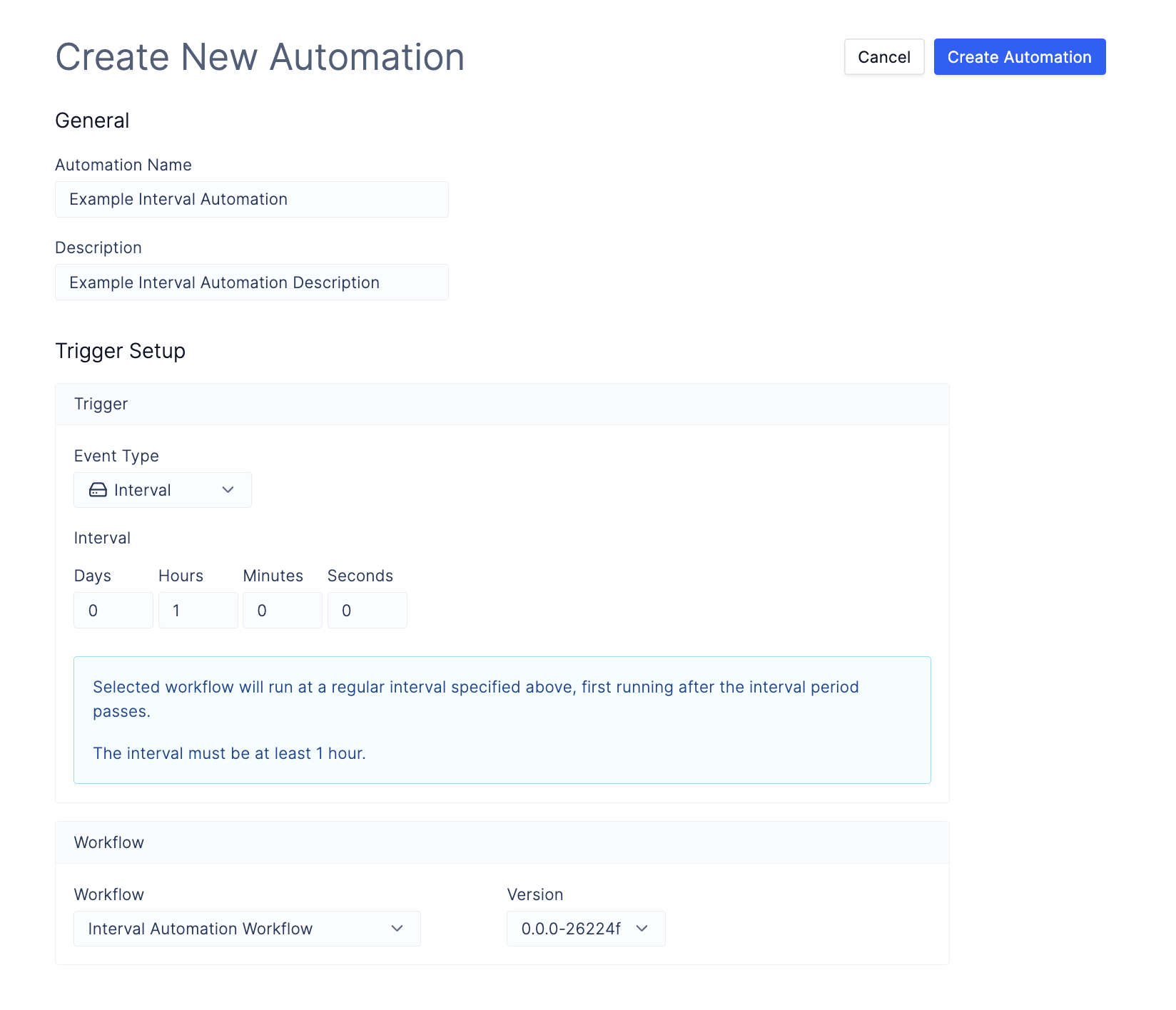
Navigate to [Automations](https://console.latch.bio/automations) tab via **Worfklows** > **Automations** and click on the **Create Automation** button.
1. Input an **Automation Name** and **Description**.
2. Select the `Event Type` as `Interval`.
3. Specify `Interval` to 1 hour.
4. Select the automation workflow that you have just registered with Latch.