> ## Documentation Index
> Fetch the complete documentation index at: https://wiki.latch.bio/llms.txt
> Use this file to discover all available pages before exploring further.

# Bulk RNAseq Quantification Walkthrough

## Upload your RNAseq data

<Steps>
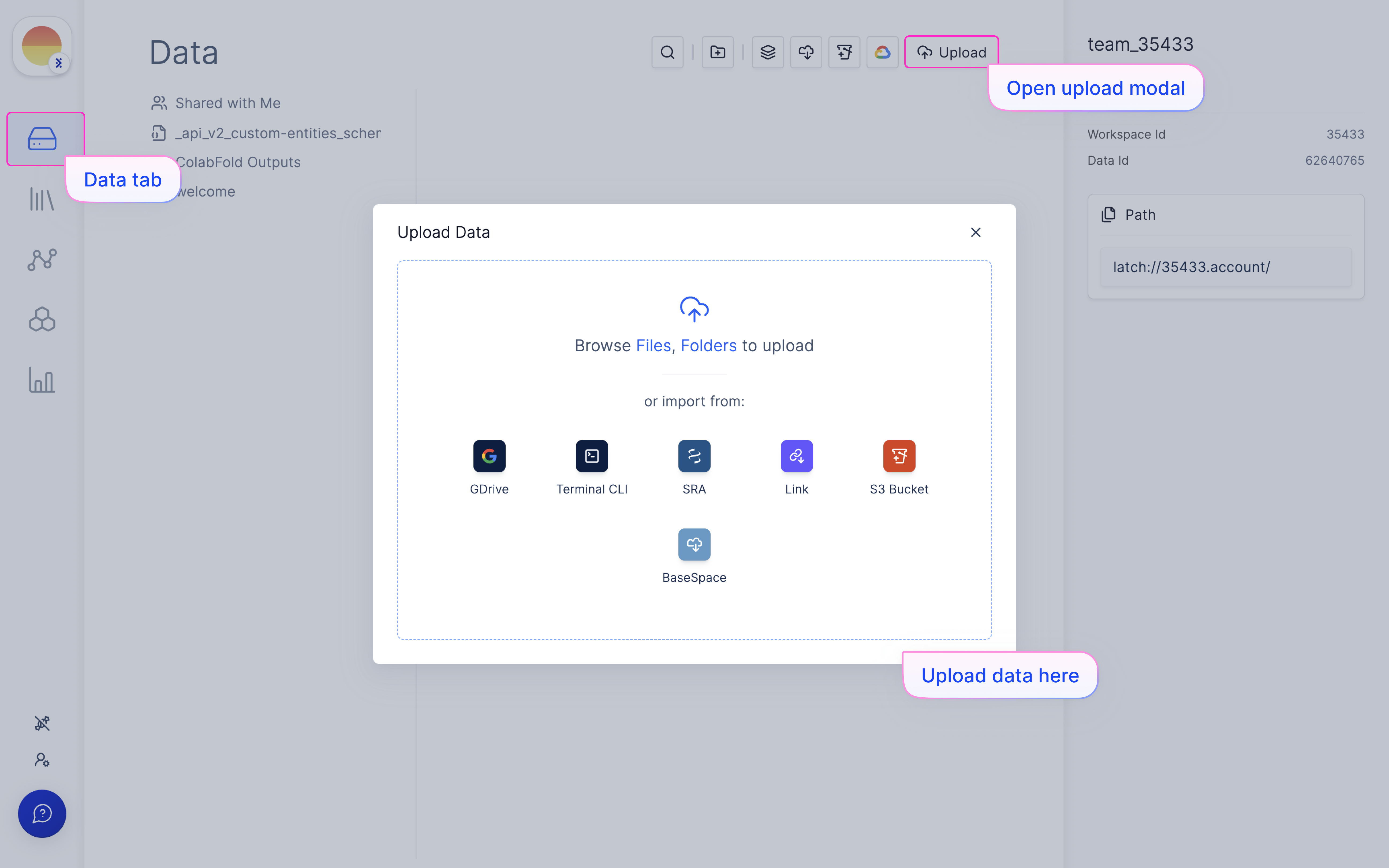
  <Step title="Navigate to the Latch Data tab on the left panel.">
    Use the ‘Upload’ modal found on the top right, and upload your raw .fastq or .fastq.gz files to Latch Data with the upload modal.

    <img src="https://mintcdn.com/latchbio/LdV6VvwVO8ylN7Bn/images/bulk-rna-seq-quant/bulkrna1.png?fit=max&auto=format&n=LdV6VvwVO8ylN7Bn&q=85&s=1b77ed14f00bf8a92a1562a4729616de" className="w-full border-slate-100 border rounded-md" width="5184" height="3240" data-path="images/bulk-rna-seq-quant/bulkrna1.png" />
  </Step>
</Steps>

### Set up samplesheet on Latch Registry

<Steps>
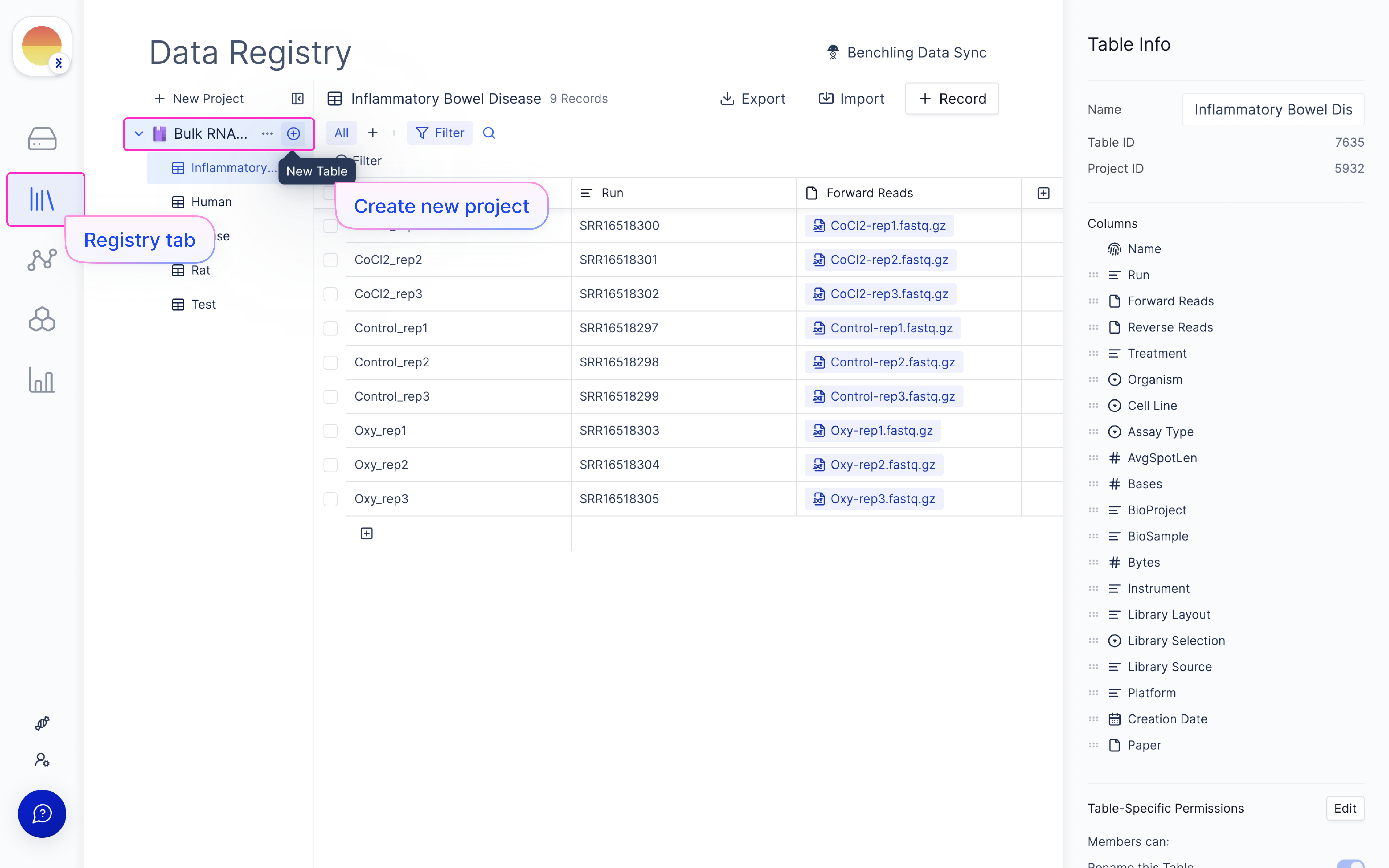
  <Step title="Navigate to the Latch Registry tab on the left panel.">
    Create new Project (if needed) and a new Sheet under that Project for the experiment being run.

    <img src="https://mintcdn.com/latchbio/LdV6VvwVO8ylN7Bn/images/bulk-rna-seq-quant/bulkrna2.png?fit=max&auto=format&n=LdV6VvwVO8ylN7Bn&q=85&s=d91e7231f9eb6edc4739ced0e07997bc" className="w-full border-slate-100 border rounded-md" width="5184" height="3240" data-path="images/bulk-rna-seq-quant/bulkrna2.png" />
  </Step>

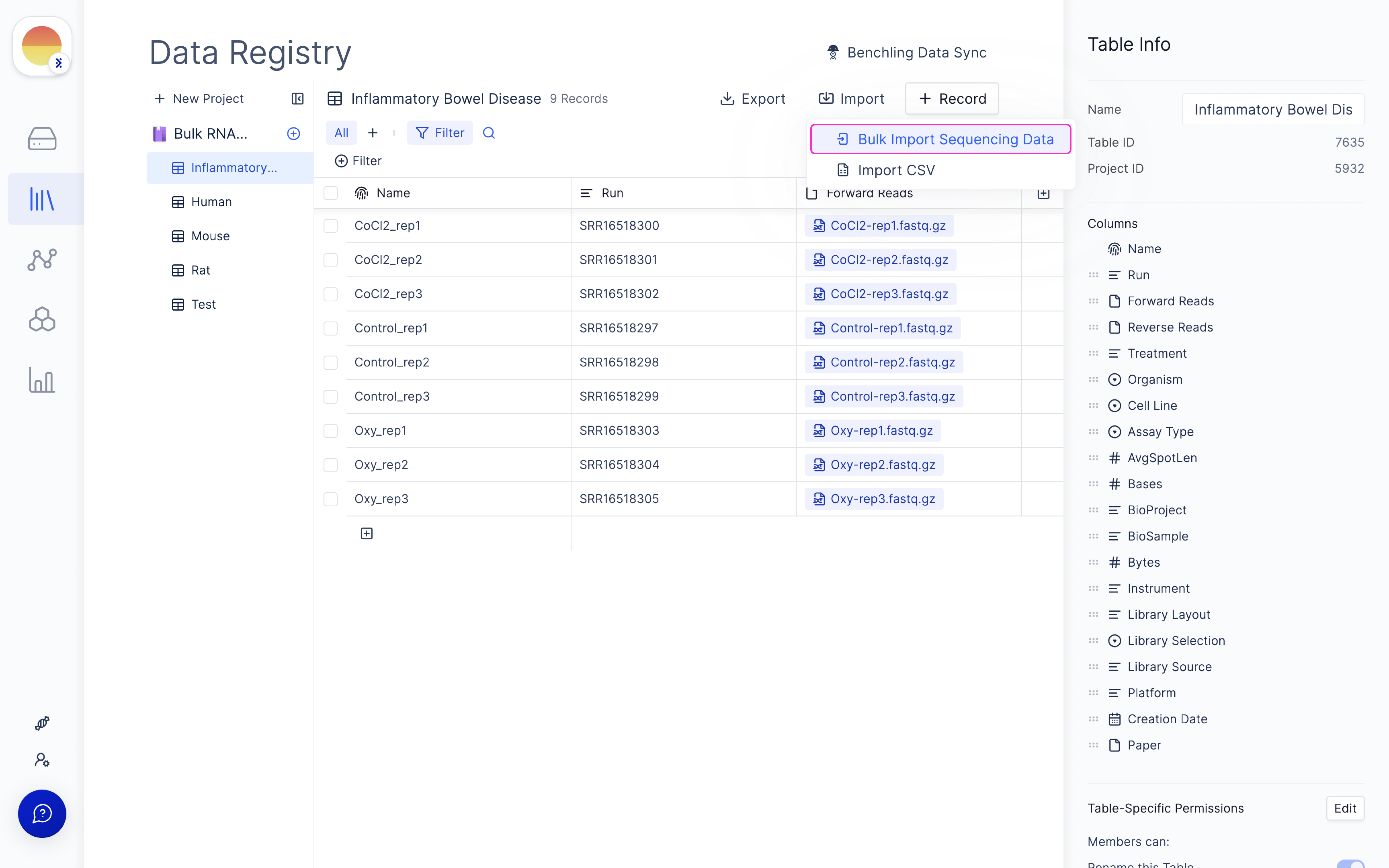
  <Step title="Select the ‘Import -> Bulk Import Sequencing Data’ modal on the top right of the screen.">
    <img src="https://mintcdn.com/latchbio/rBOhi8AJn1gA0vrv/images/bulk-rna-seq-quant/bulkrna3.png?fit=max&auto=format&n=rBOhi8AJn1gA0vrv&q=85&s=0dc438e9e5992b6400004fc960bbe9f2" className="w-full border-slate-100 border rounded-md" width="5184" height="3240" data-path="images/bulk-rna-seq-quant/bulkrna3.png" />
  </Step>

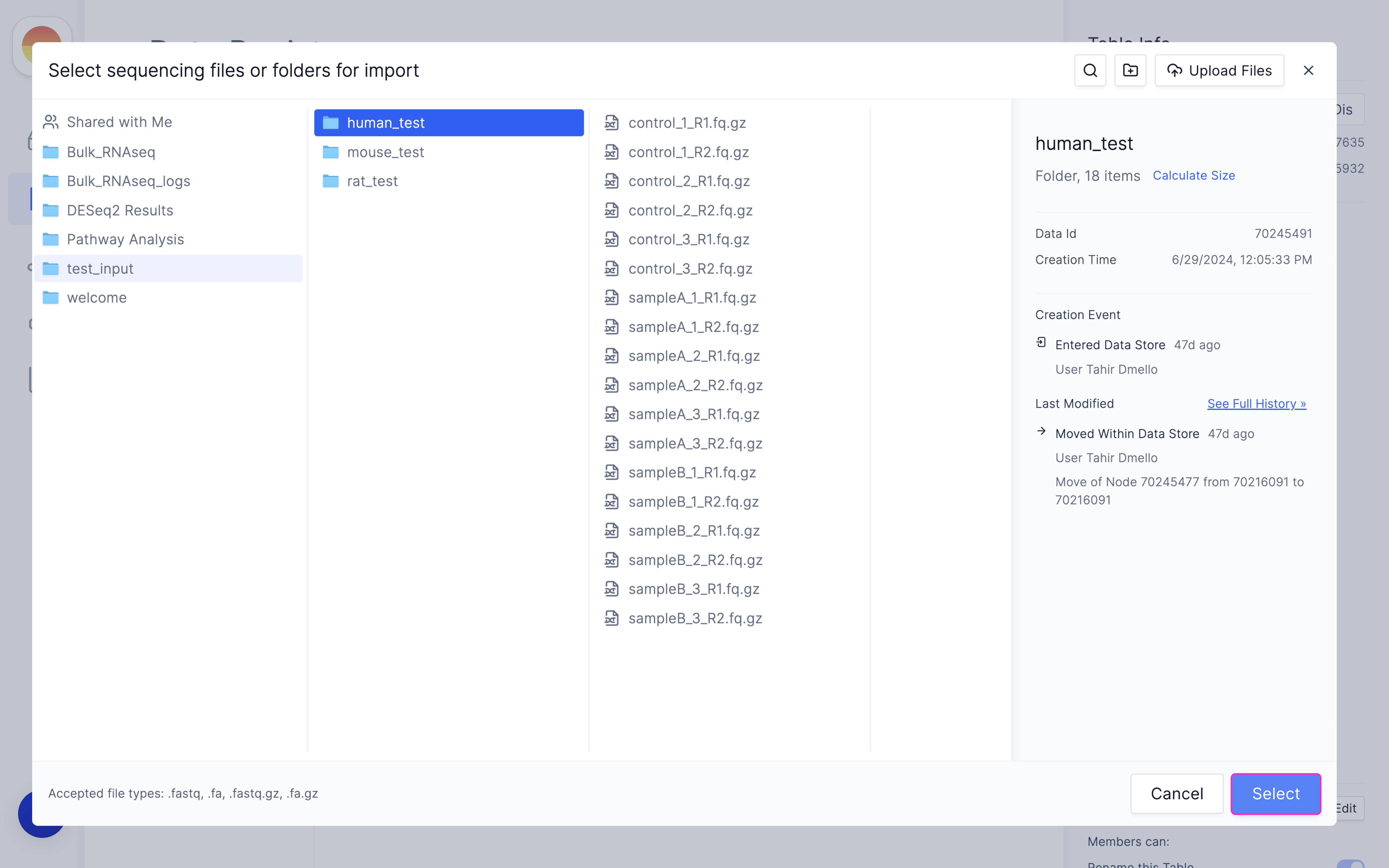
  <Step title="Choose the folder containing your raw RNAseq data and click ‘Select’.">
    <img src="https://mintcdn.com/latchbio/rBOhi8AJn1gA0vrv/images/bulk-rna-seq-quant/bulkrna4.png?fit=max&auto=format&n=rBOhi8AJn1gA0vrv&q=85&s=779b613b781820ccb2e39377ce65aa58" className="w-full border-slate-100 border rounded-md" width="5184" height="3240" data-path="images/bulk-rna-seq-quant/bulkrna4.png" />
  </Step>

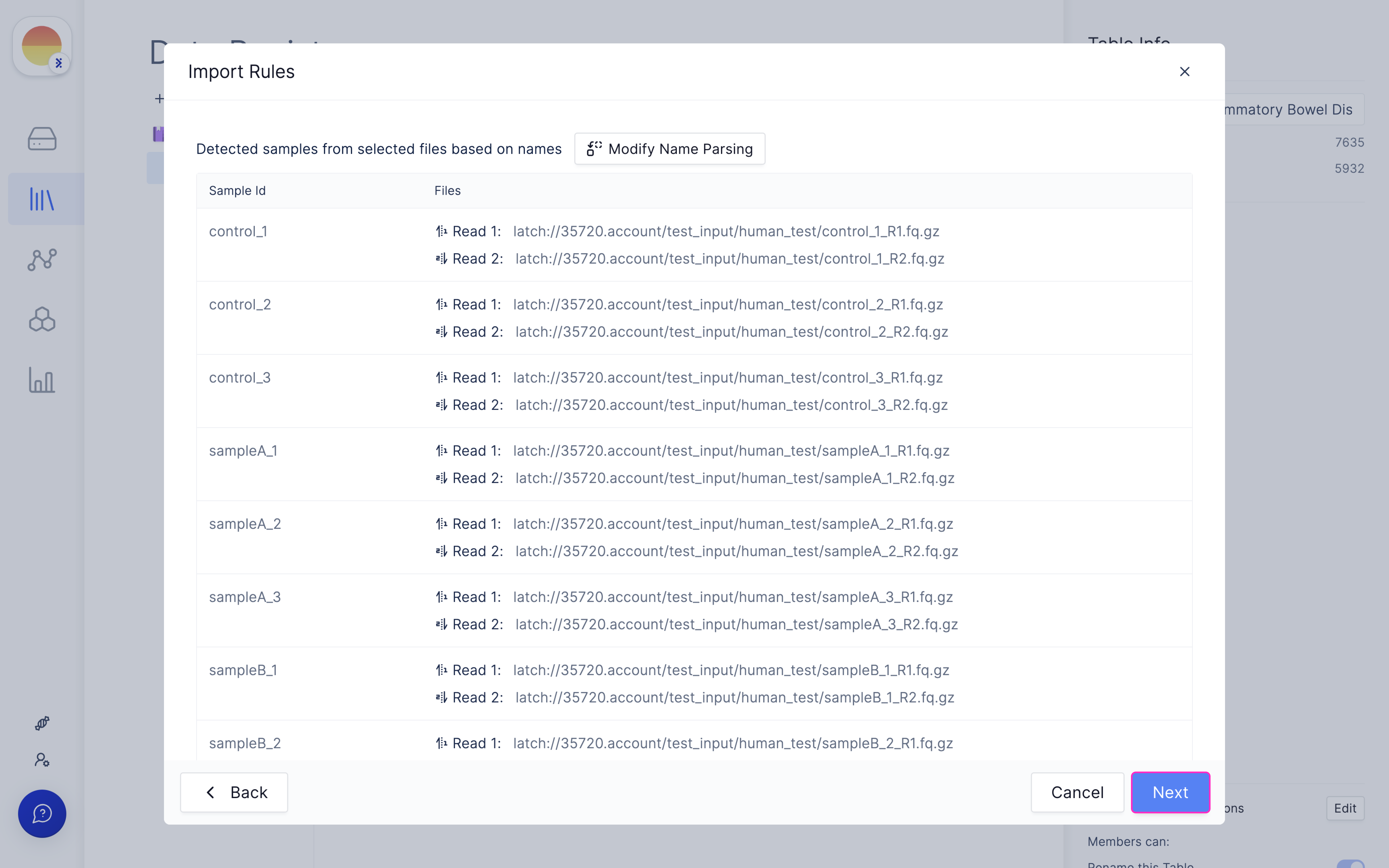
  <Step title="Confirm or modify name parsing method used to auto-group your samples and click ‘Next’.">
    <img src="https://mintcdn.com/latchbio/rBOhi8AJn1gA0vrv/images/bulk-rna-seq-quant/bulkrna5.png?fit=max&auto=format&n=rBOhi8AJn1gA0vrv&q=85&s=e9d3247f8e6792c61a04d0f6b0fb2c5b" className="w-full border-slate-100 border rounded-md" width="5184" height="3240" data-path="images/bulk-rna-seq-quant/bulkrna5.png" />
  </Step>

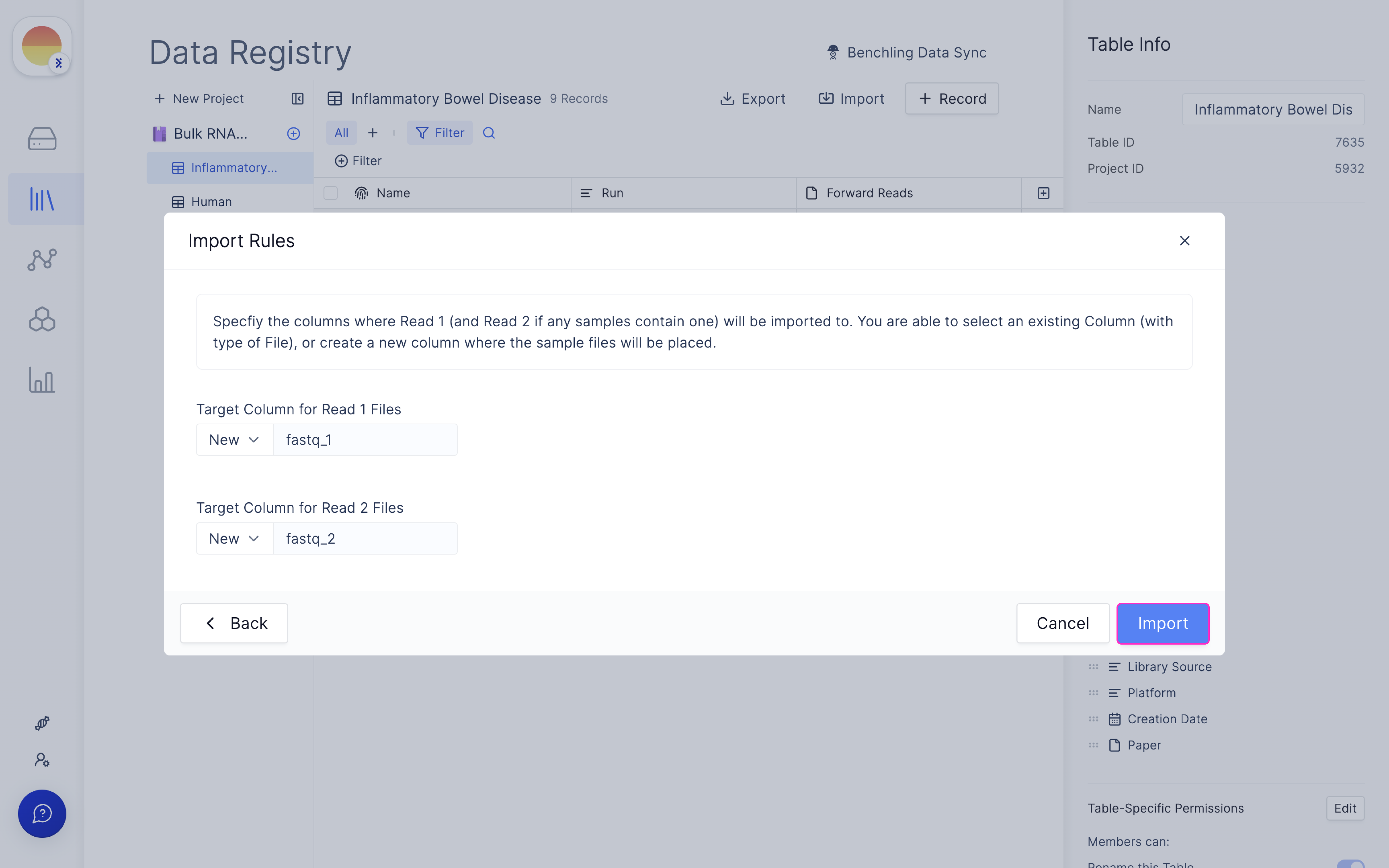
  <Step title="Fill in ‘fastq_1’ and ‘fastq_2’ for your forward and reverse read file respectively and click ‘Import’.">
    <img src="https://mintcdn.com/latchbio/rBOhi8AJn1gA0vrv/images/bulk-rna-seq-quant/bulkrna6.png?fit=max&auto=format&n=rBOhi8AJn1gA0vrv&q=85&s=f9656526fd8a46c85b6b6dc0ad2f8086" className="w-full border-slate-100 border rounded-md" width="5184" height="3240" data-path="images/bulk-rna-seq-quant/bulkrna6.png" />
  </Step>

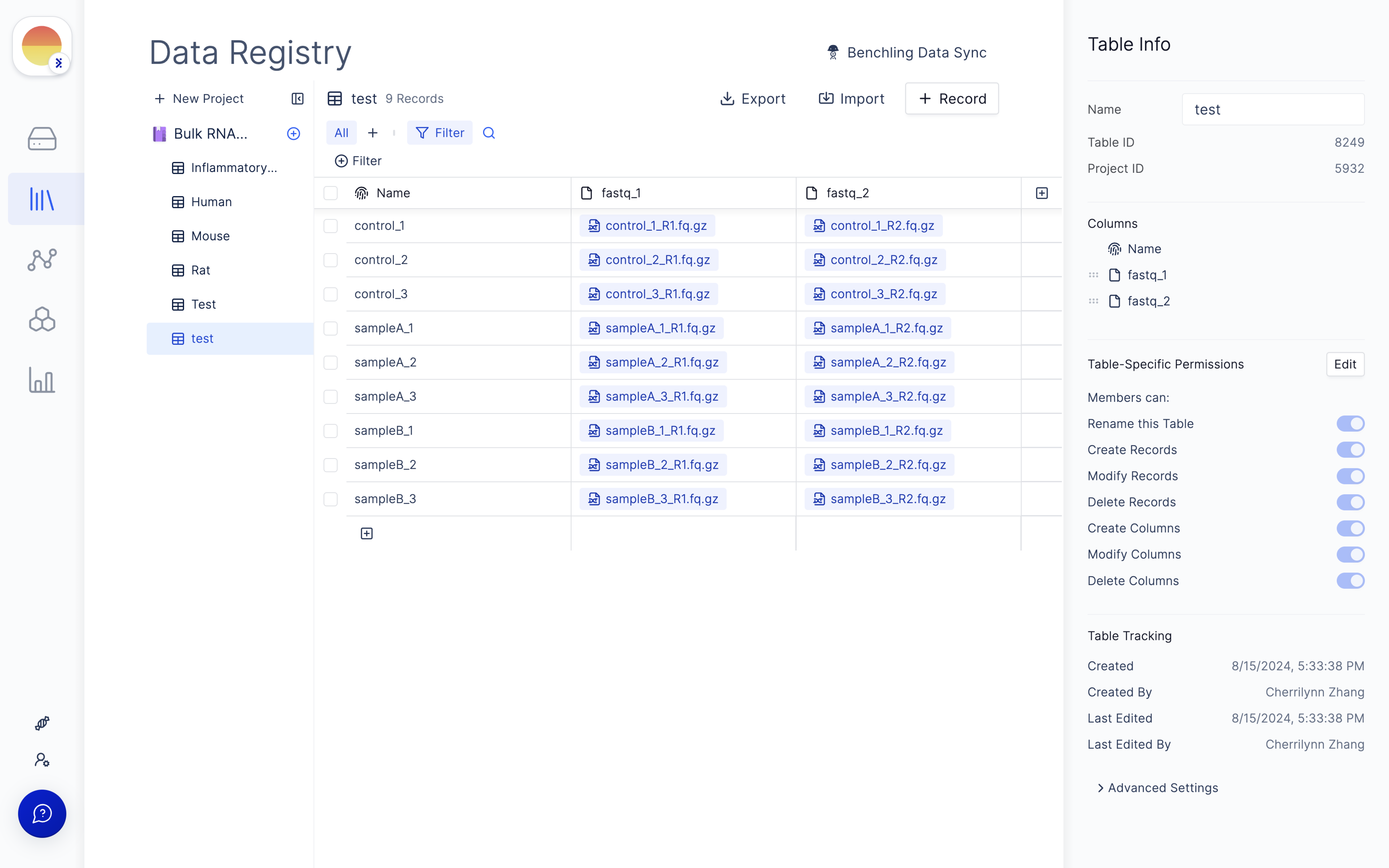
  <Step title="This will generate a samplesheet on Latch Registry for your data.">
    <img src="https://mintcdn.com/latchbio/rBOhi8AJn1gA0vrv/images/bulk-rna-seq-quant/bulkrna7.png?fit=max&auto=format&n=rBOhi8AJn1gA0vrv&q=85&s=a2870183f7b9f807a8e87b4de3868257" className="w-full border-slate-100 border rounded-md" width="5184" height="3240" data-path="images/bulk-rna-seq-quant/bulkrna7.png" />
  </Step>
</Steps>

### Launch ‘nf-core/rnaseq’ Latch Workflow

<Steps>
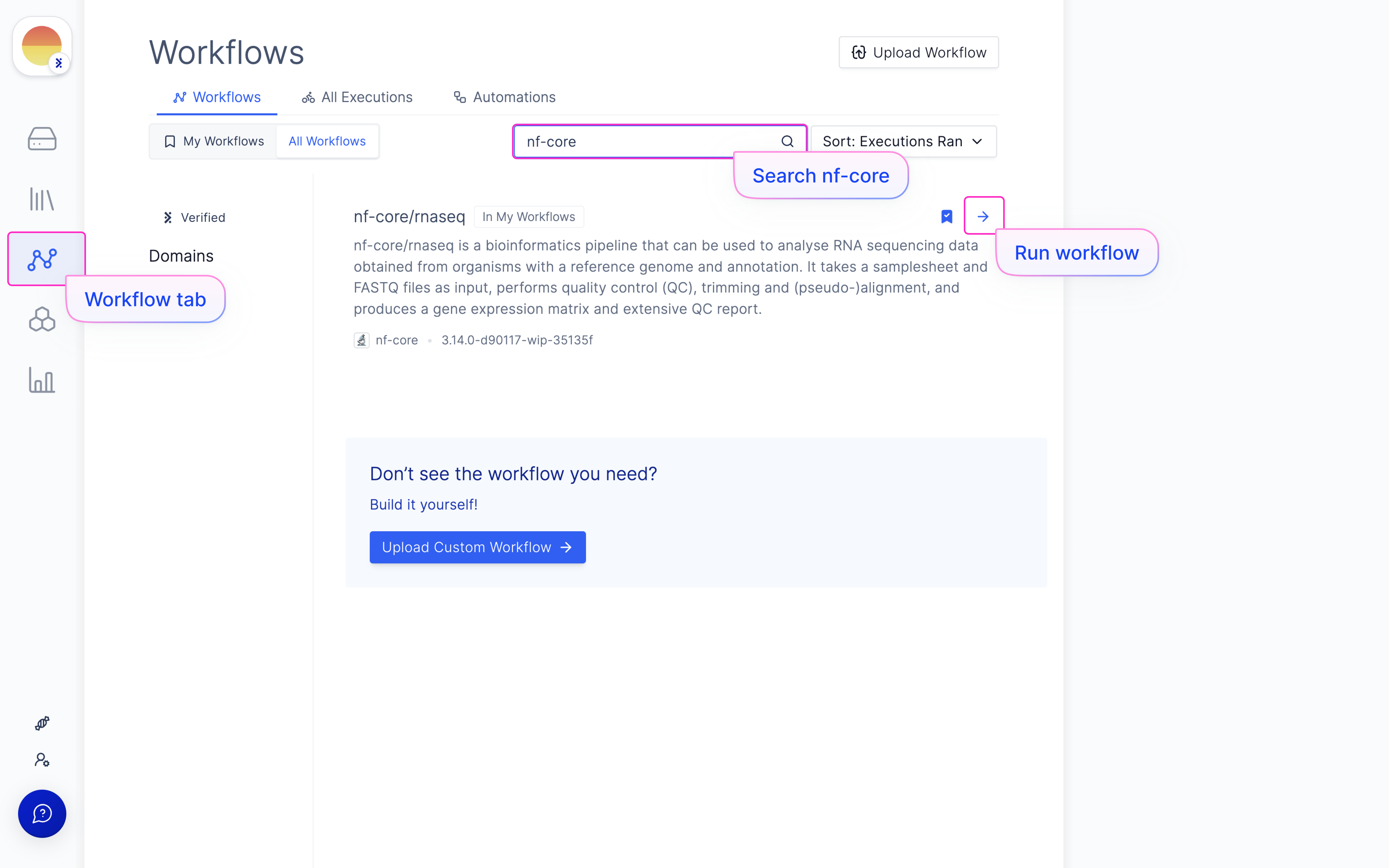
  <Step title="Navigate to the Latch Workflows tab on the left panel.">
    Choose the ‘nf-core/rnaseq’ workflow in ‘All Workflows’ or My Workflows’ (if you have added it).

    <img src="https://mintcdn.com/latchbio/rBOhi8AJn1gA0vrv/images/bulk-rna-seq-quant/bulkrna8.png?fit=max&auto=format&n=rBOhi8AJn1gA0vrv&q=85&s=abc206f5400a96c327381933ffba7243" className="w-full border-slate-100 border rounded-md" width="5184" height="3240" data-path="images/bulk-rna-seq-quant/bulkrna8.png" />
  </Step>

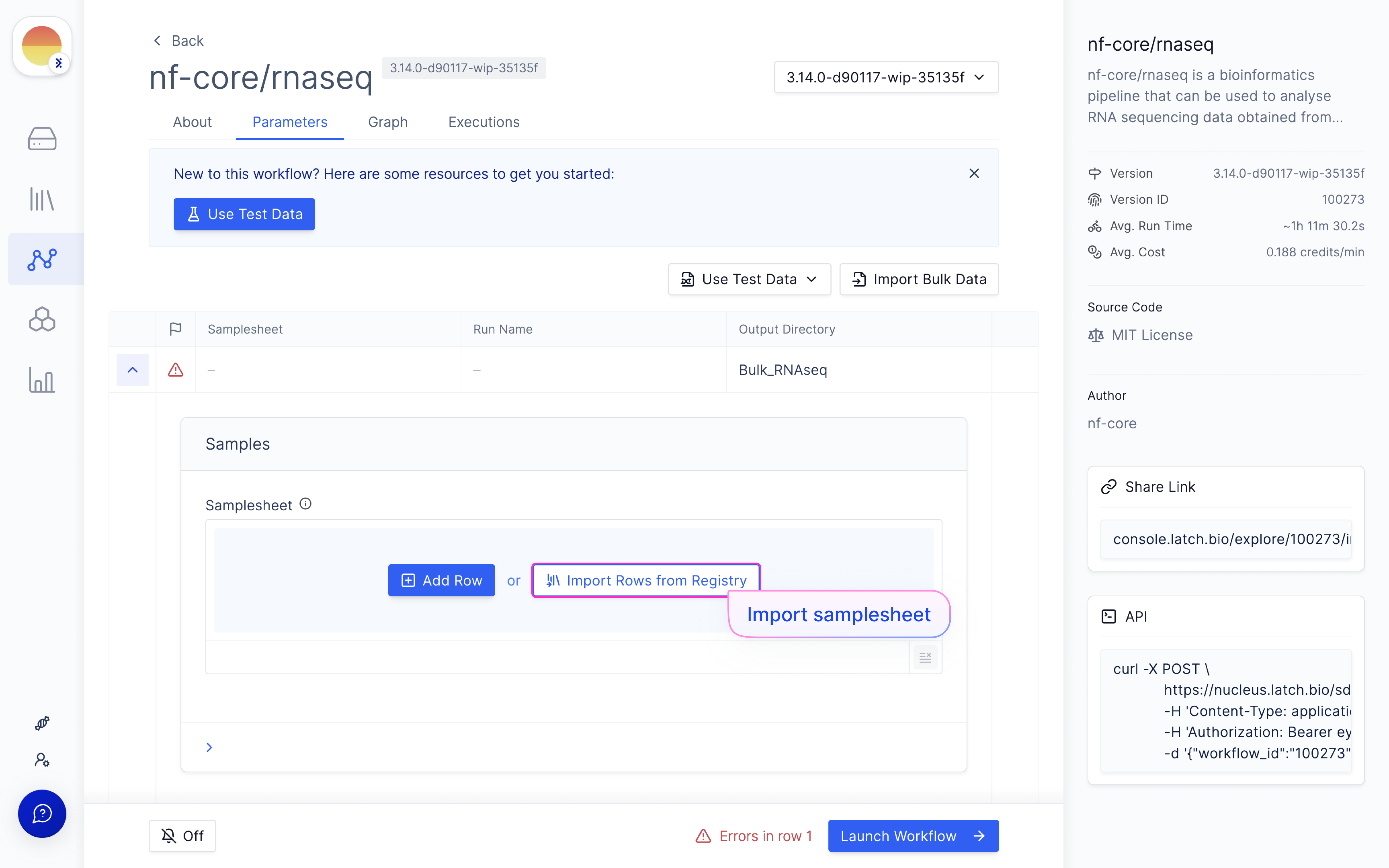
  <Step title="Import samplesheet with ‘Import Rows from Registry’.">
    <img src="https://mintcdn.com/latchbio/rBOhi8AJn1gA0vrv/images/bulk-rna-seq-quant/bulkrna9.png?fit=max&auto=format&n=rBOhi8AJn1gA0vrv&q=85&s=3e3b51f71de8143e2ad05b2e9078d878" className="w-full border-slate-100 border rounded-md" width="5184" height="3240" data-path="images/bulk-rna-seq-quant/bulkrna9.png" />
  </Step>

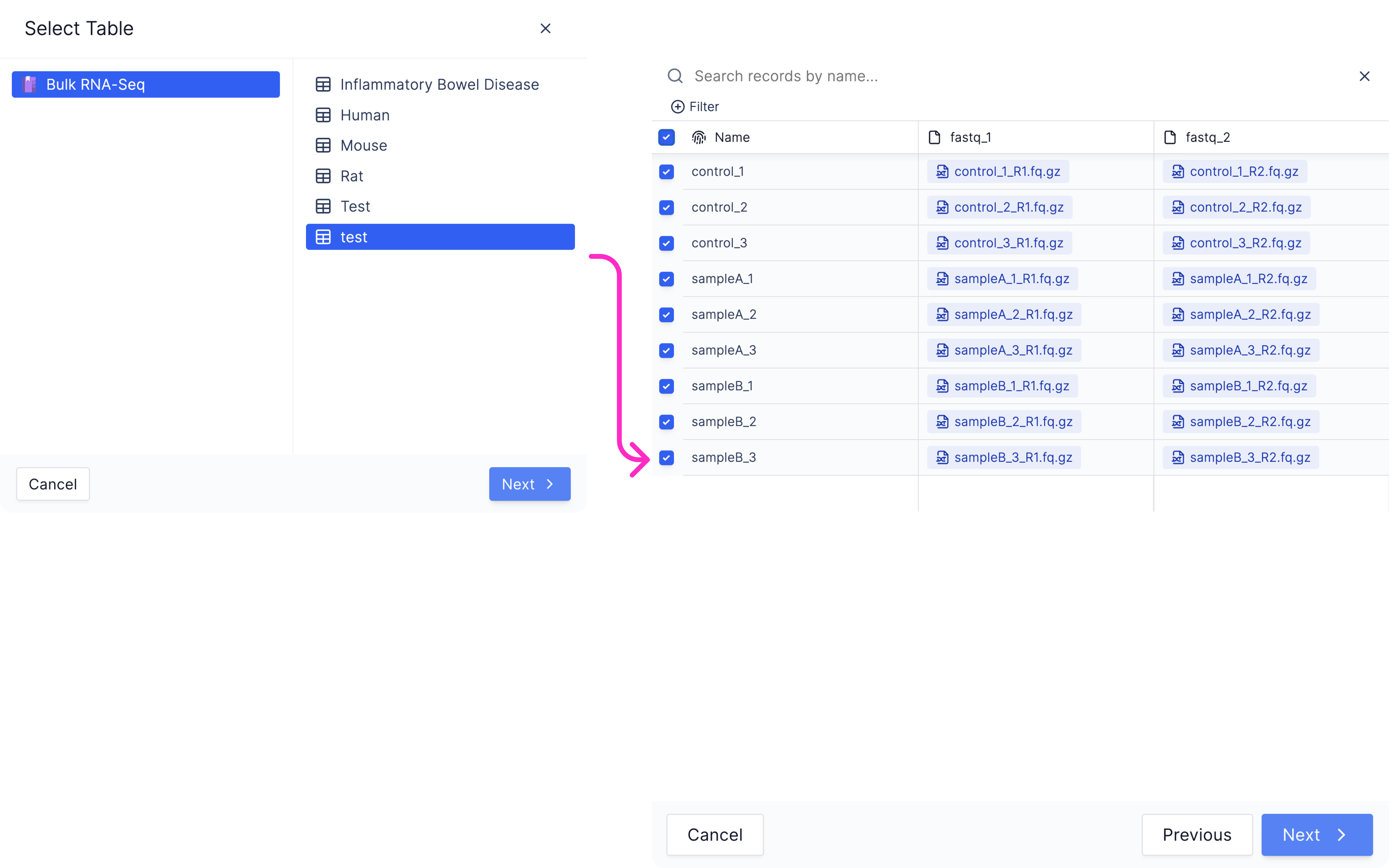
  <Step title="Choose needed samplesheet, followed by needed samples (select all on top left if needed.">
    <img src="https://mintcdn.com/latchbio/LdV6VvwVO8ylN7Bn/images/bulk-rna-seq-quant/bulkrna10.png?fit=max&auto=format&n=LdV6VvwVO8ylN7Bn&q=85&s=244b0afbb30e0bd266f3eec623960b4c" width="5184" height="3240" data-path="images/bulk-rna-seq-quant/bulkrna10.png" />
  </Step>

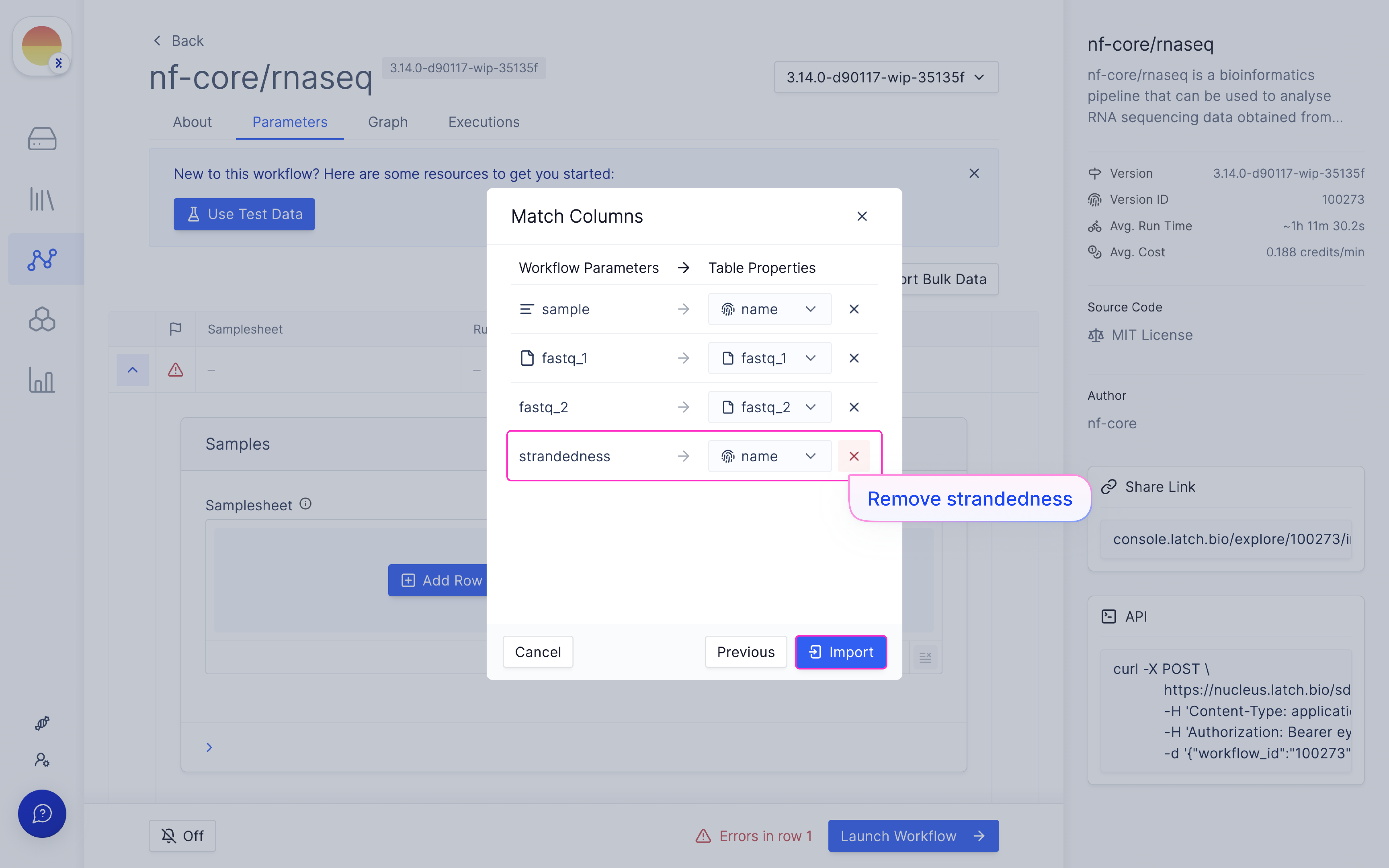
  <Step title="Map samplesheet columns to workflow parameters and click ‘Import’.">
    <Note>Click on the (x) for strandedness in most cases - only use strandedness if you have an nf-core specific strandedness column in your metadata.</Note>

    <img src="https://mintcdn.com/latchbio/LdV6VvwVO8ylN7Bn/images/bulk-rna-seq-quant/bulkrna11.png?fit=max&auto=format&n=LdV6VvwVO8ylN7Bn&q=85&s=199d42cd26dd6101f498f6e40c8cf39d" className="w-full border-slate-100 border rounded-md" width="5184" height="3240" data-path="images/bulk-rna-seq-quant/bulkrna11.png" />
  </Step>

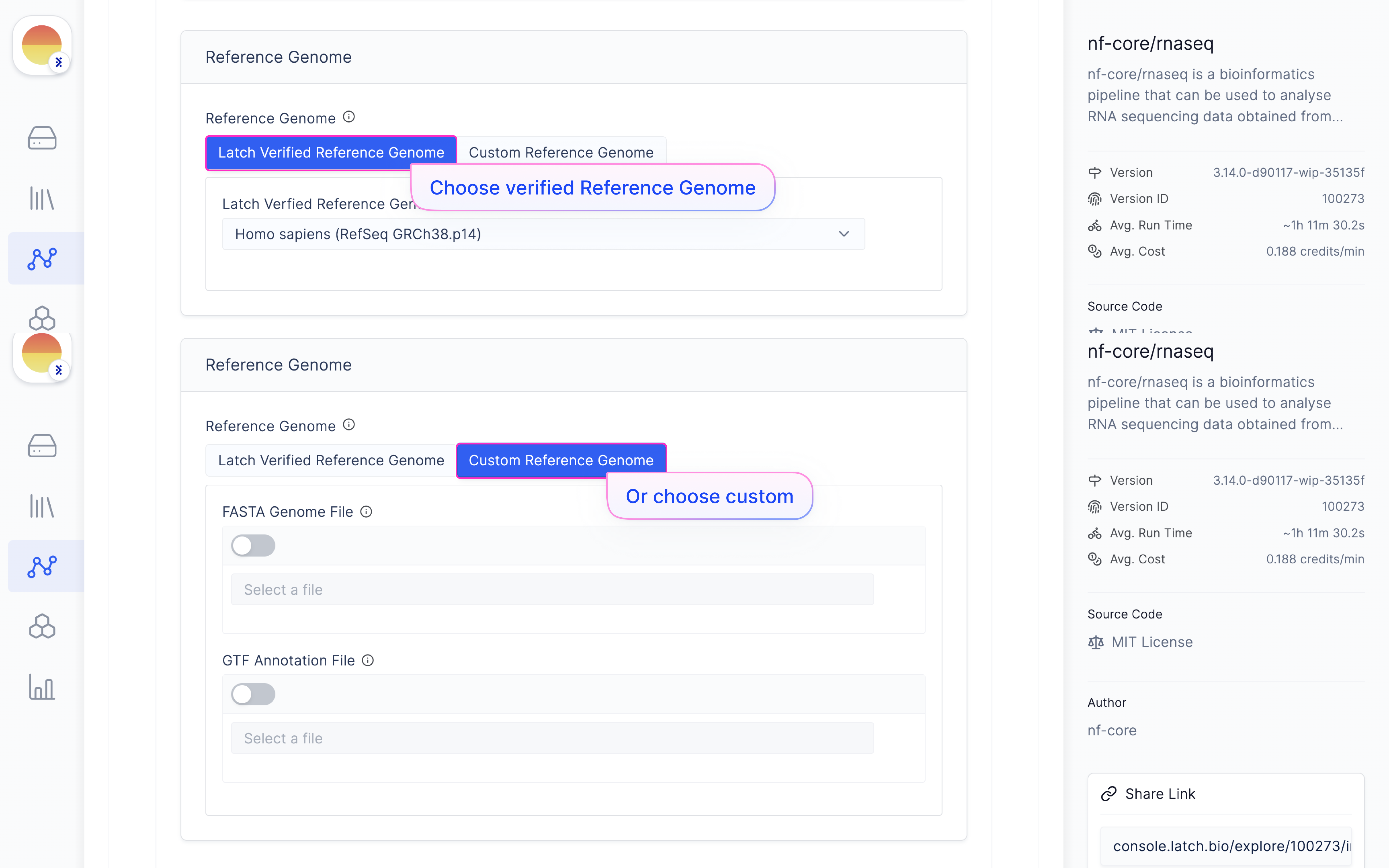
  <Step title="Choose ‘Reference Genome’ from ‘Latch Verified Reference Genome’ tab.">
    Or choose your own Reference FASTA and GTF in the ‘Custom Reference Genome’ tab.

    <img src="https://mintcdn.com/latchbio/LdV6VvwVO8ylN7Bn/images/bulk-rna-seq-quant/bulkrna12.png?fit=max&auto=format&n=LdV6VvwVO8ylN7Bn&q=85&s=bf5c4b726752ab38fba66578232cabd7" className="rounded-md" width="5184" height="3240" data-path="images/bulk-rna-seq-quant/bulkrna12.png" />
  </Step>

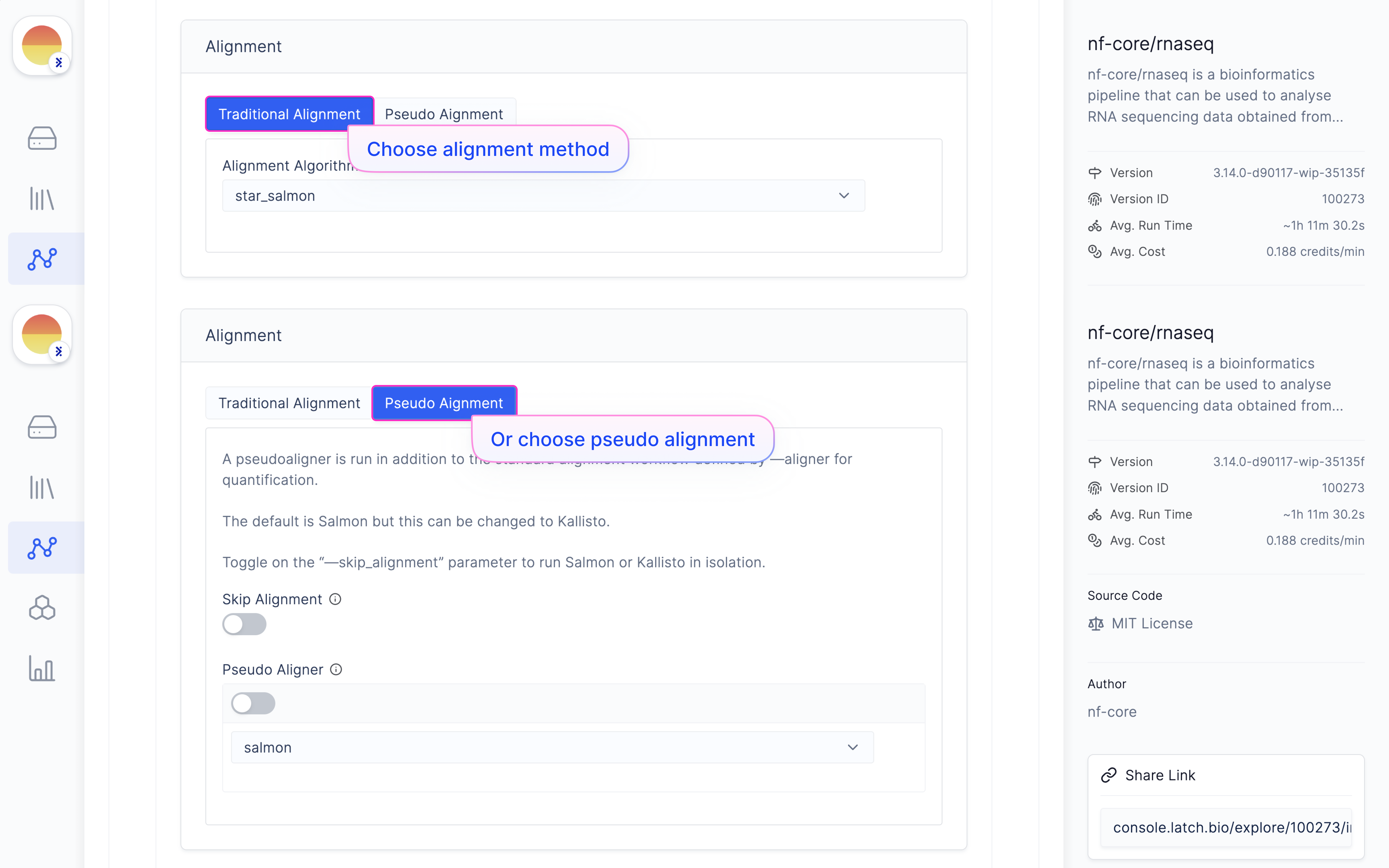
  <Step title="[Optional - Advanced] Choose alignment method or pseudoalignment method.">
    <img src="https://mintcdn.com/latchbio/LdV6VvwVO8ylN7Bn/images/bulk-rna-seq-quant/bulkrna13.png?fit=max&auto=format&n=LdV6VvwVO8ylN7Bn&q=85&s=2f099572de4e1a8348b746ea47a305c2" className="rounded-md" width="5184" height="3240" data-path="images/bulk-rna-seq-quant/bulkrna13.png" />
  </Step>

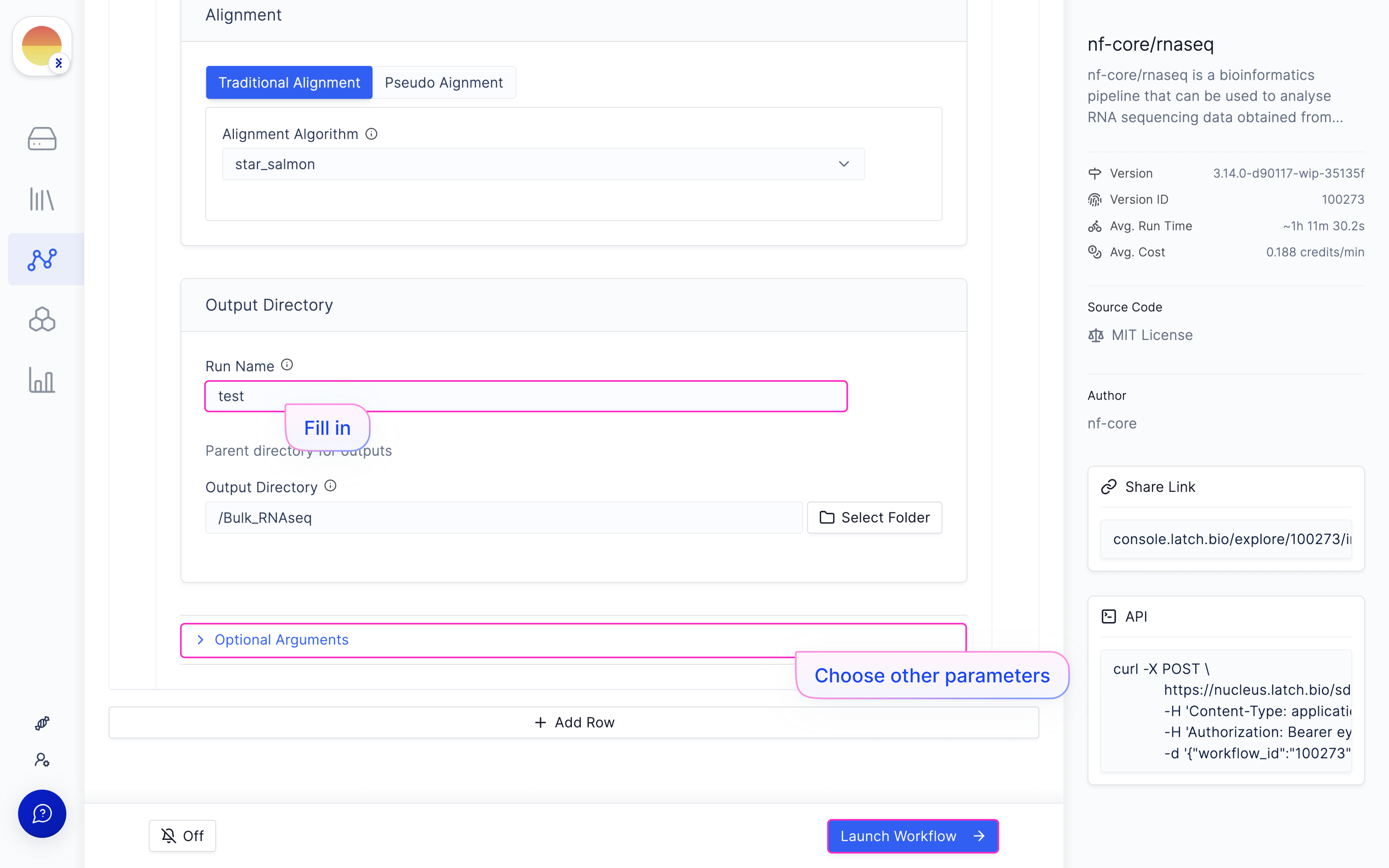
  <Step title="[Fill in a ‘Run Name’ and hit ‘Launch Execution’.">
    Do not use spaces in the Run Name.

    <Note>We recommend leaving the Output Directory to its default location.</Note>

    (Optional - Advanced) Choose other parameters in ‘Optional Arguments’.
    <Note>There are descriptions for every parameter available when you hover above the (i) symbol on a parameter name.</Note>

    <img src="https://mintcdn.com/latchbio/LdV6VvwVO8ylN7Bn/images/bulk-rna-seq-quant/bulkrna14.png?fit=max&auto=format&n=LdV6VvwVO8ylN7Bn&q=85&s=47130aad06dddb6e9b02cb60e216a300" className="w-full border-slate-100 border rounded-md" width="5184" height="3240" data-path="images/bulk-rna-seq-quant/bulkrna14.png" />
  </Step>

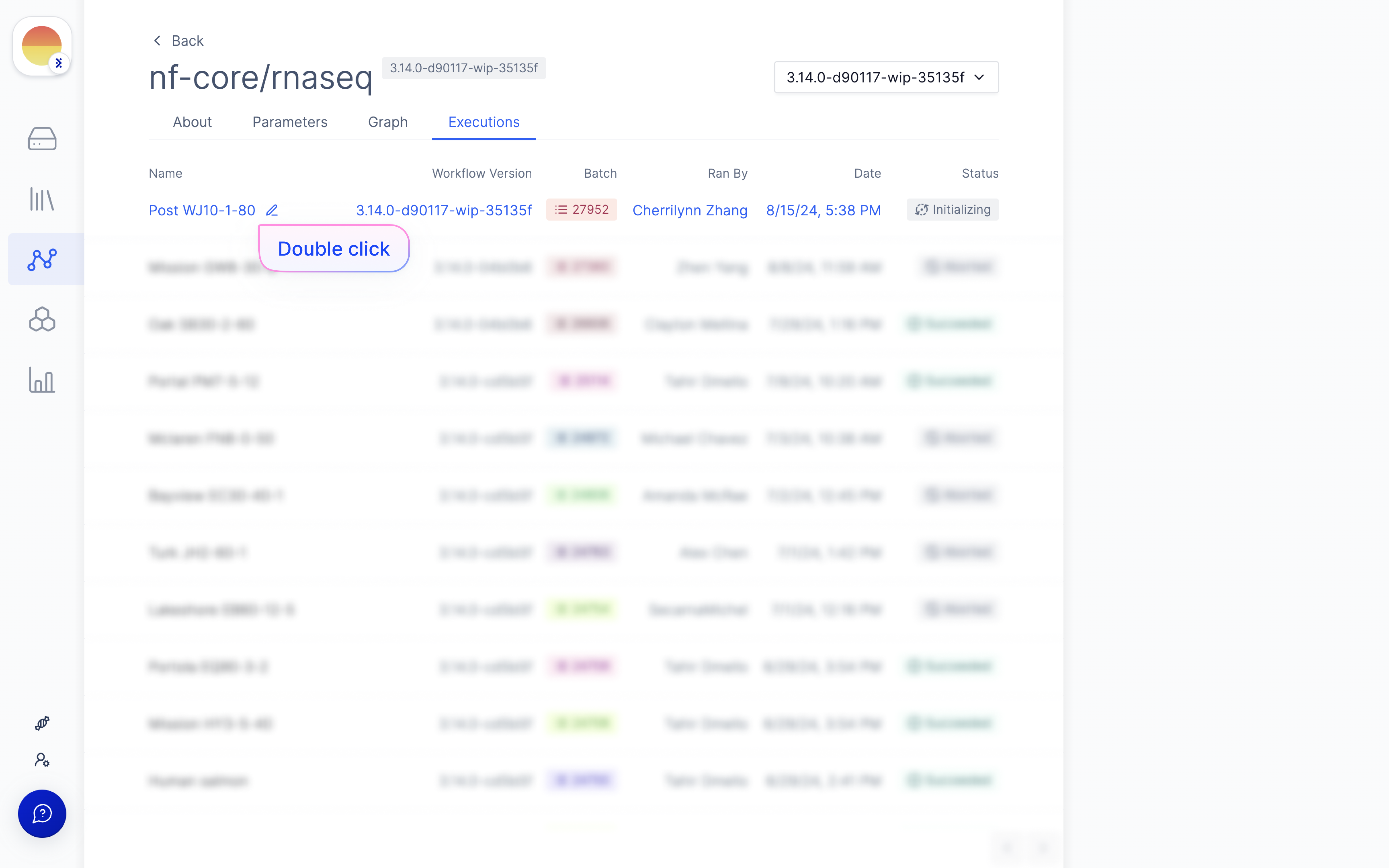
  <Step title="[Optional] Monitor the execution under ‘All Executions’.">
    Double click the execution to be taken to detailed logs.

    <img src="https://mintcdn.com/latchbio/LdV6VvwVO8ylN7Bn/images/bulk-rna-seq-quant/bulkrna15.png?fit=max&auto=format&n=LdV6VvwVO8ylN7Bn&q=85&s=80ddcea69bea5816df6cef5e2f6a156f" className="w-full border-slate-100 border rounded-md" width="5184" height="3240" data-path="images/bulk-rna-seq-quant/bulkrna15.png" />
  </Step>

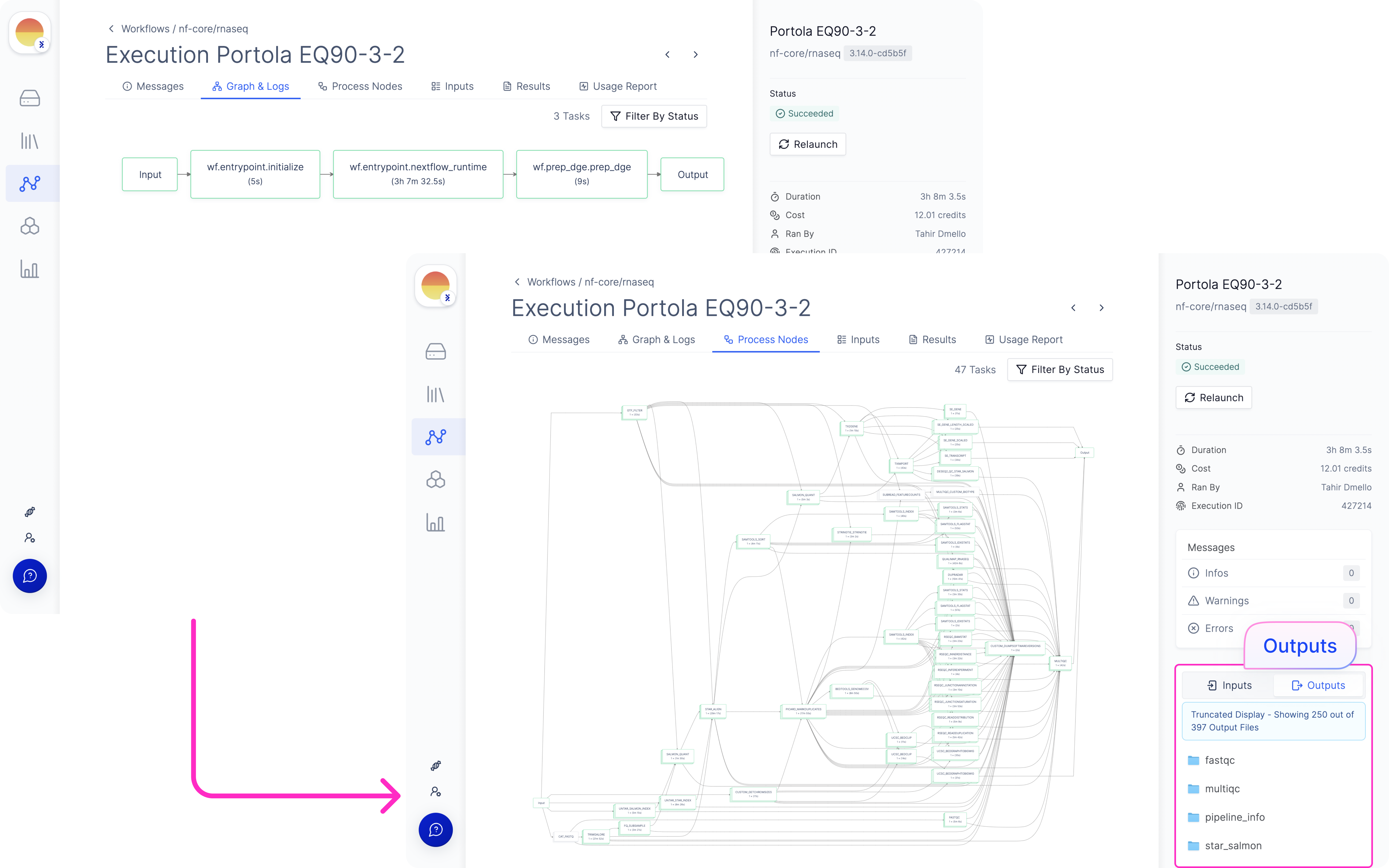
  <Step title="Once complete, the output will be found in the output directory under your provided run name.">
    Useful outputs are the run HTML report and all the computational outputs in the folder that matches the name of the aligner you used.

    <img src="https://mintcdn.com/latchbio/LdV6VvwVO8ylN7Bn/images/bulk-rna-seq-quant/bulkrna16.png?fit=max&auto=format&n=LdV6VvwVO8ylN7Bn&q=85&s=44909f4bf75276f75dd7c0321bf776e3" className="rounded-md" width="5184" height="3240" data-path="images/bulk-rna-seq-quant/bulkrna16.png" />
  </Step>
</Steps>

## Differential Gene Expression

### Launch ‘DESeq2 (Differential Expression)’ Latch Workflow

<Steps>
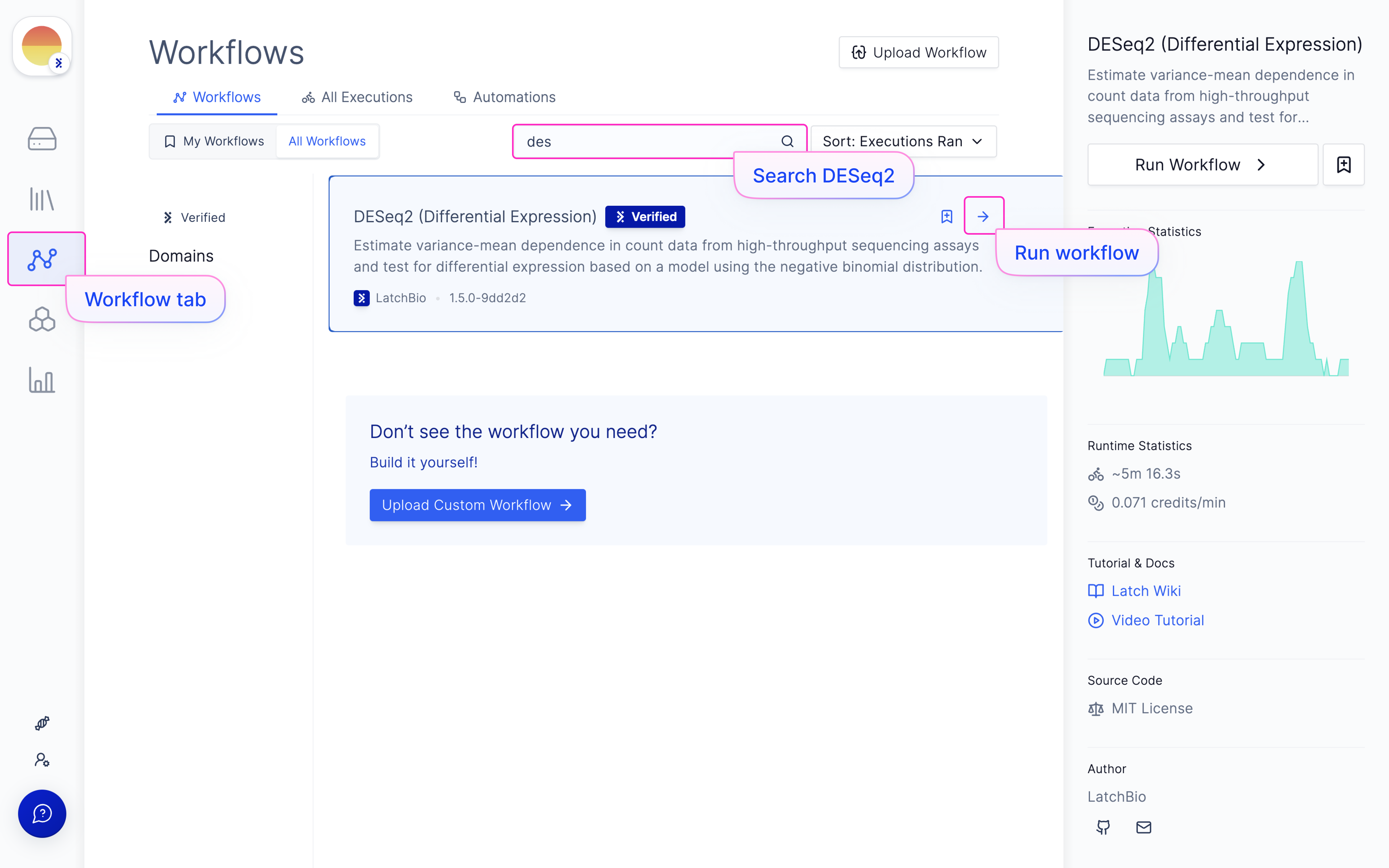
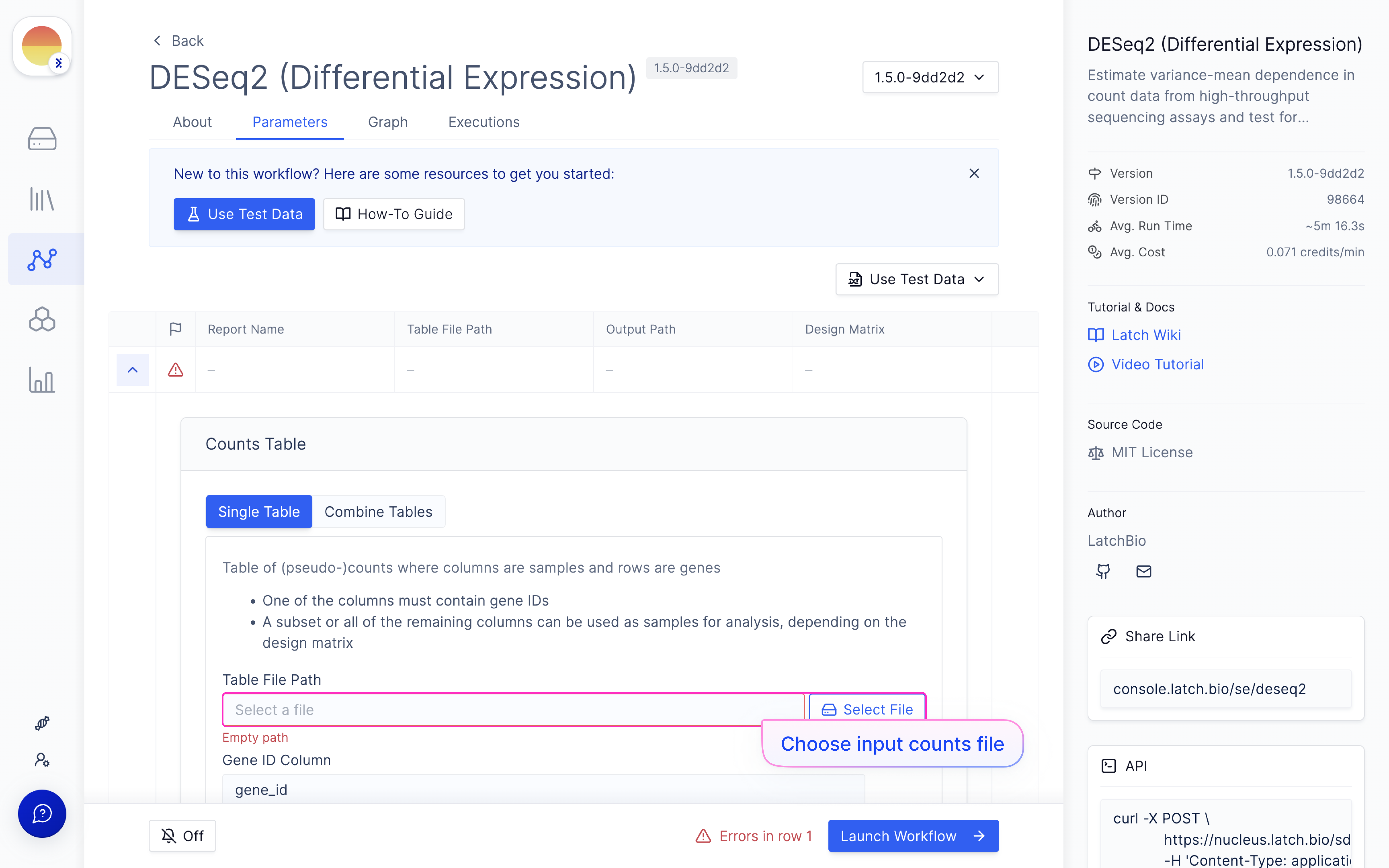
  <Step title="Navigate to the Latch Workflows tab on the left panel.">
    Choose the ‘DESeq2 (Differential Expression)’ workflow in ‘All Workflows’ or My Workflows’ (if you have added it).

    <img src="https://mintcdn.com/latchbio/LdV6VvwVO8ylN7Bn/images/bulk-rna-seq-quant/bulkrna17.png?fit=max&auto=format&n=LdV6VvwVO8ylN7Bn&q=85&s=452558c2ecaa365910bf22396f56bb14" className="w-full border-slate-100 border rounded-md" width="5184" height="3240" data-path="images/bulk-rna-seq-quant/bulkrna17.png" />
  </Step>

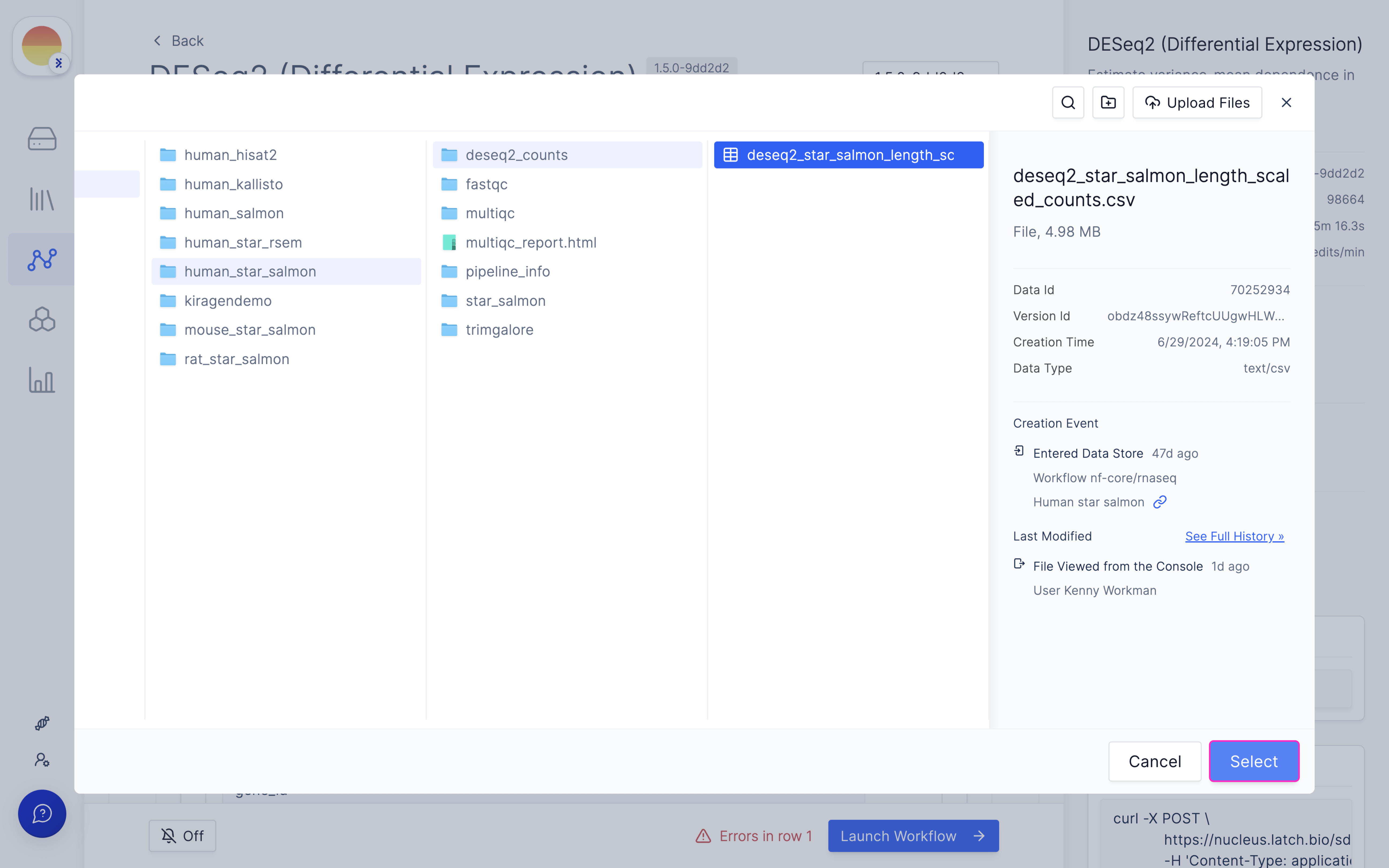
  <Step title="Choose your input counts file from the outputs of ‘nf-core/rnaseq’.">
    <Note>All outputs from ‘nf-core/rnaseq’ have an output folder called ‘deseq2\_counts’ with a TSV file that is the optimal input for DESeq2.</Note>

    <img src="https://mintcdn.com/latchbio/LdV6VvwVO8ylN7Bn/images/bulk-rna-seq-quant/bulkrna18.png?fit=max&auto=format&n=LdV6VvwVO8ylN7Bn&q=85&s=5ff6176b4748819fba83b8db403c6aab" className="w-full border-slate-100 border rounded-md" width="5184" height="3240" data-path="images/bulk-rna-seq-quant/bulkrna18.png" />

    <img src="https://mintcdn.com/latchbio/LdV6VvwVO8ylN7Bn/images/bulk-rna-seq-quant/bulkrna19.png?fit=max&auto=format&n=LdV6VvwVO8ylN7Bn&q=85&s=ff39ffe4d67097fd0d250e981fd0aab4" className="w-full border-slate-100 border rounded-md" width="5184" height="3240" data-path="images/bulk-rna-seq-quant/bulkrna19.png" />
  </Step>

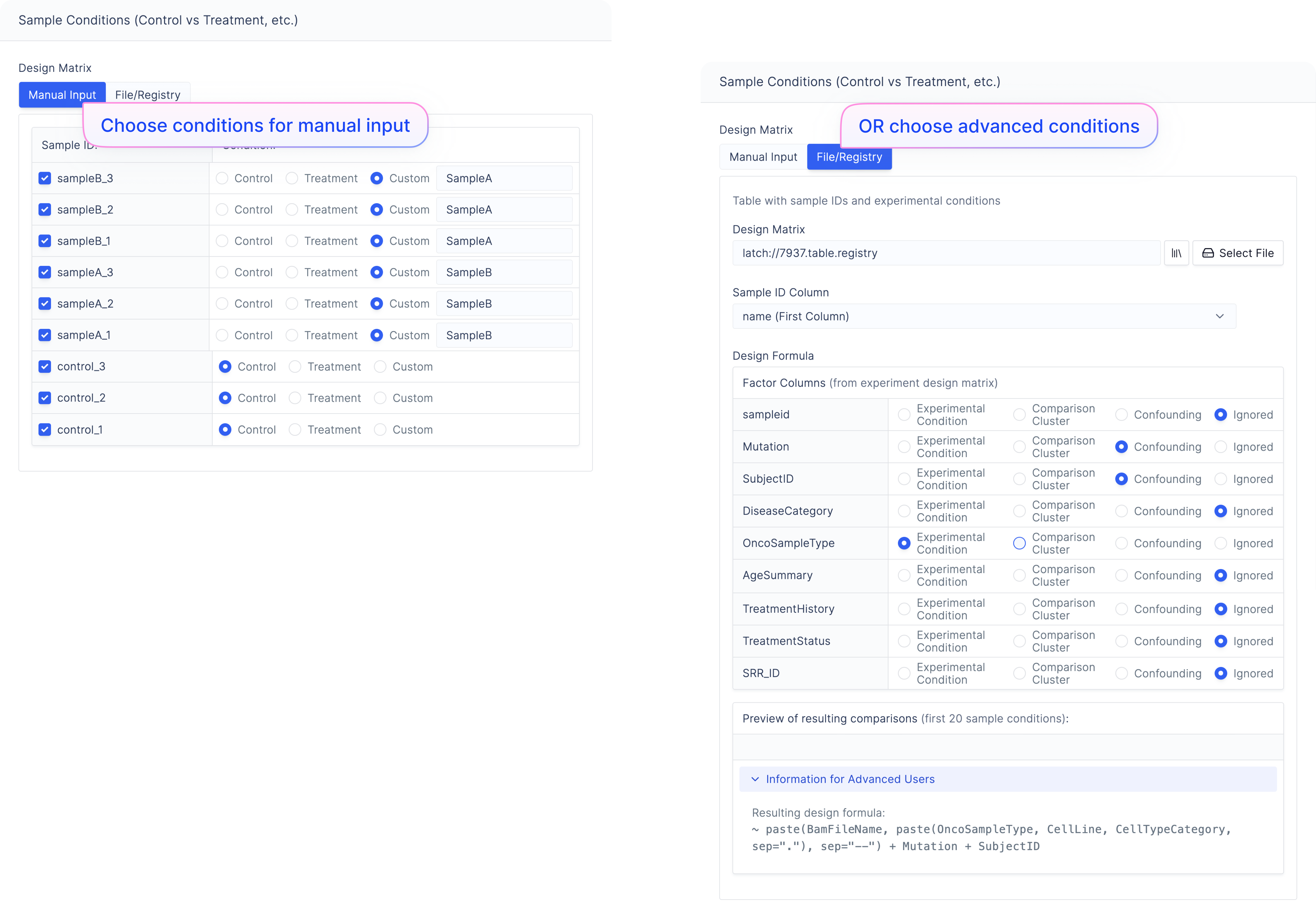
  <Step title="Choose your conditions for your samples in the ‘Manual Input’ design matrix tab.">
    Or choose advanced conditions for your samples in the ‘File/Registry’ tab through Latch Data or Latch Registry.

    <img src="https://mintcdn.com/latchbio/LdV6VvwVO8ylN7Bn/images/bulk-rna-seq-quant/bulkrna20.png?fit=max&auto=format&n=LdV6VvwVO8ylN7Bn&q=85&s=61966fc825a358cbe1af40c5f36302c2" className="rounded-md" width="5184" height="3615" data-path="images/bulk-rna-seq-quant/bulkrna20.png" />
  </Step>

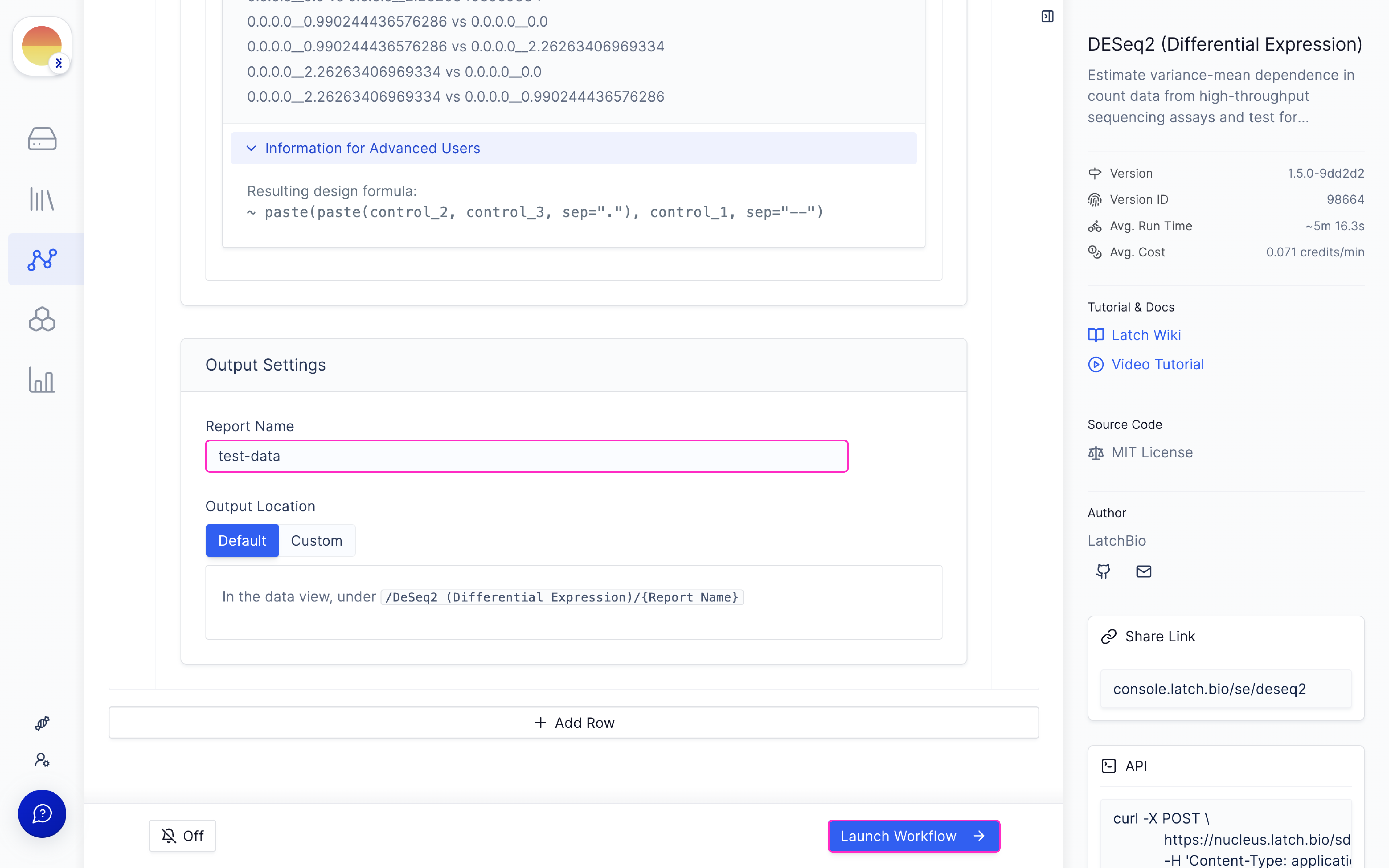
  <Step title="Choose ‘Report Name’ and hit ‘Launch Workflow’.">
    <Note>We recommend leaving the Output to its default location.</Note>

    <img src="https://mintcdn.com/latchbio/LdV6VvwVO8ylN7Bn/images/bulk-rna-seq-quant/bulkrna21.png?fit=max&auto=format&n=LdV6VvwVO8ylN7Bn&q=85&s=2bb68f66ae539b51194796f06c5c8cf6" className="w-full border-slate-100 border rounded-md" width="5184" height="3240" data-path="images/bulk-rna-seq-quant/bulkrna21.png" />
  </Step>
</Steps>

### Visualize differential gene expression outputs in Latch Plots

<Steps>
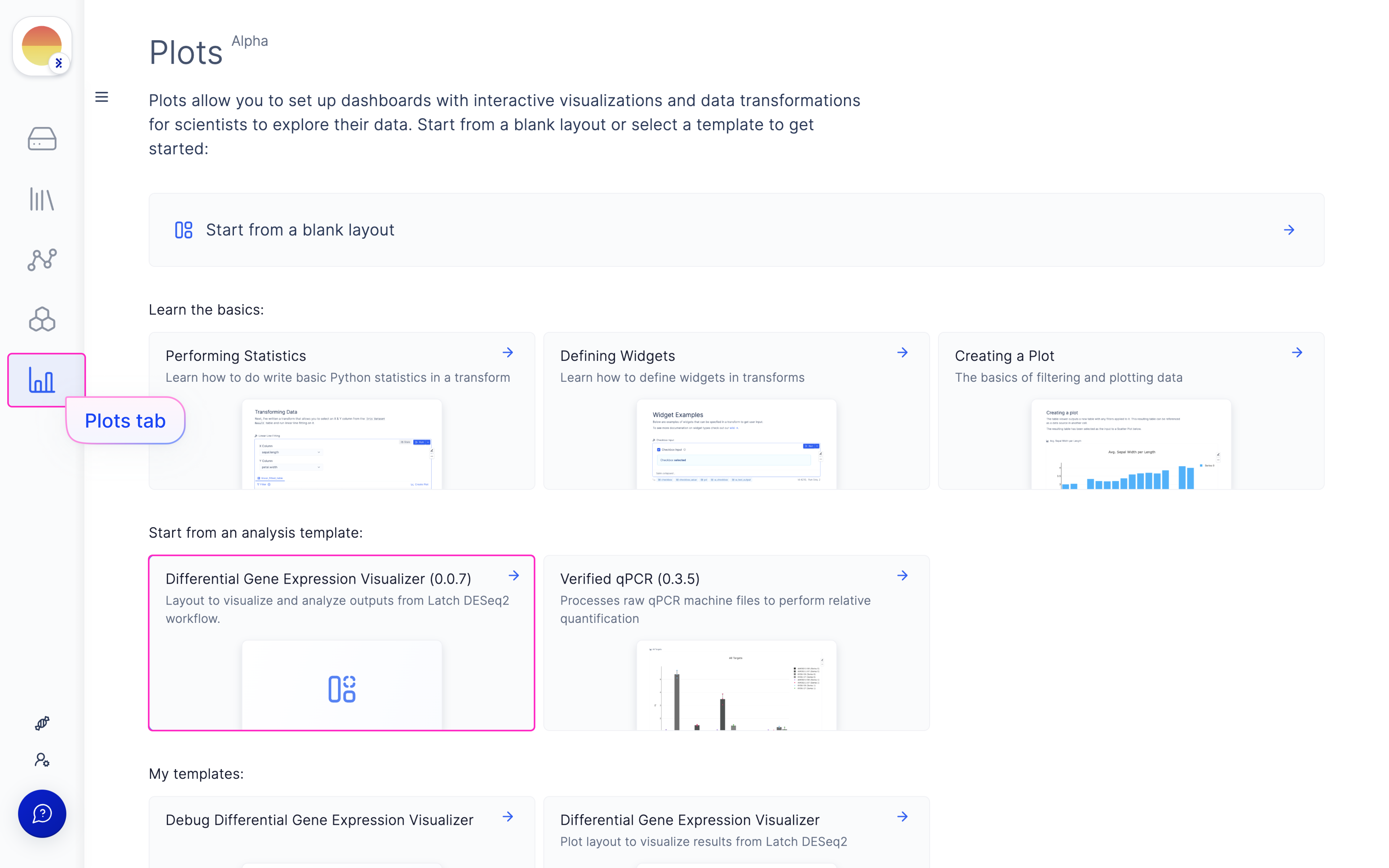
  <Step title="Navigate to the Latch Plots tab on the left panel.">
    Choose the ‘Differential Gene Expression Visualizer (0.0.6)’ template.

    <img src="https://mintcdn.com/latchbio/LdV6VvwVO8ylN7Bn/images/bulk-rna-seq-quant/bulkrna22.png?fit=max&auto=format&n=LdV6VvwVO8ylN7Bn&q=85&s=6c33c38fe4279cab33c6aa5ec6eab764" className="w-full border-slate-100 border rounded-md" width="5184" height="3240" data-path="images/bulk-rna-seq-quant/bulkrna22.png" />
  </Step>

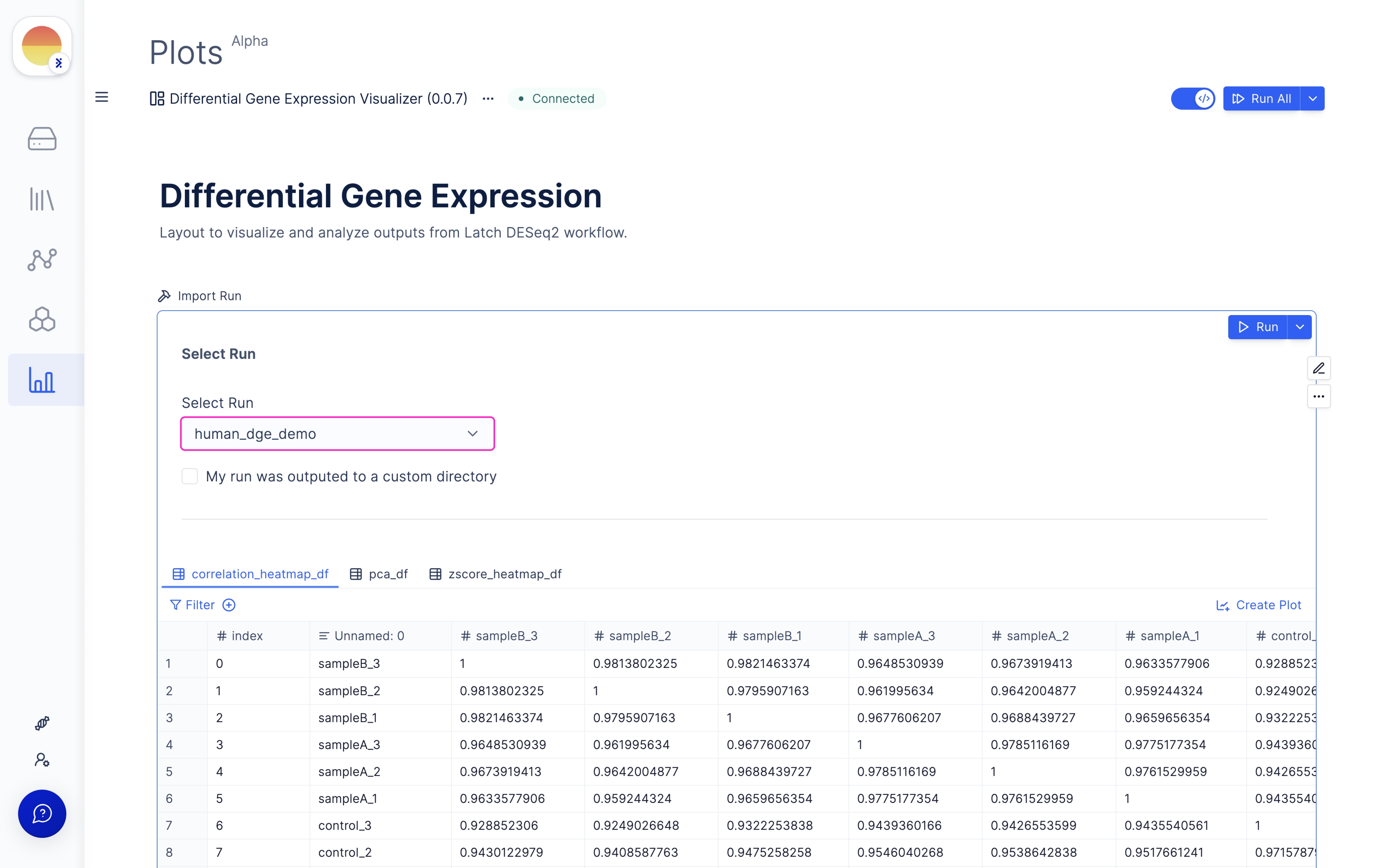
  <Step title="Once the DESeq2 run is done, choose your outputted run (or select from Latch Data if a custom output location was used) and scroll through for QC graphs and heatmaps.">
    <img src="https://mintcdn.com/latchbio/LdV6VvwVO8ylN7Bn/images/bulk-rna-seq-quant/bulkrna23.png?fit=max&auto=format&n=LdV6VvwVO8ylN7Bn&q=85&s=95b5f85b913e799f466ea7d9c040f1e4" className="w-full border-slate-100 border rounded-md" width="5184" height="3240" data-path="images/bulk-rna-seq-quant/bulkrna23.png" />
  </Step>

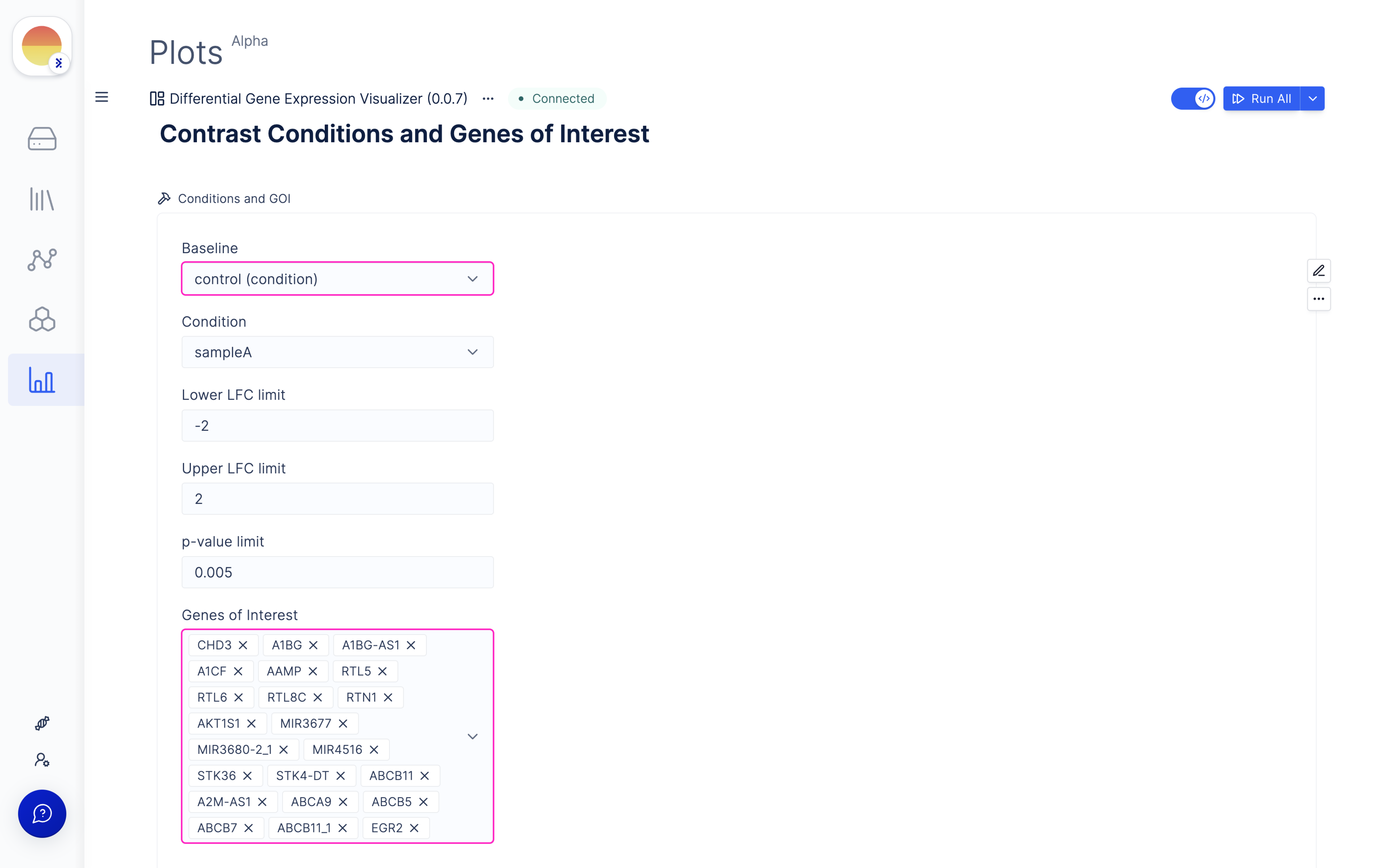
  <Step title="Choose ‘Contrast Conditions’ and ‘Genes of Interest’ for comparison and visualize Volcano and MA Plots.">
    <img src="https://mintcdn.com/latchbio/LdV6VvwVO8ylN7Bn/images/bulk-rna-seq-quant/bulkrna24.png?fit=max&auto=format&n=LdV6VvwVO8ylN7Bn&q=85&s=887aa8fb8a8ef1af660a1d2a2efa8c18" className="w-full border-slate-100 border rounded-md" width="5184" height="3240" data-path="images/bulk-rna-seq-quant/bulkrna24.png" />
  </Step>

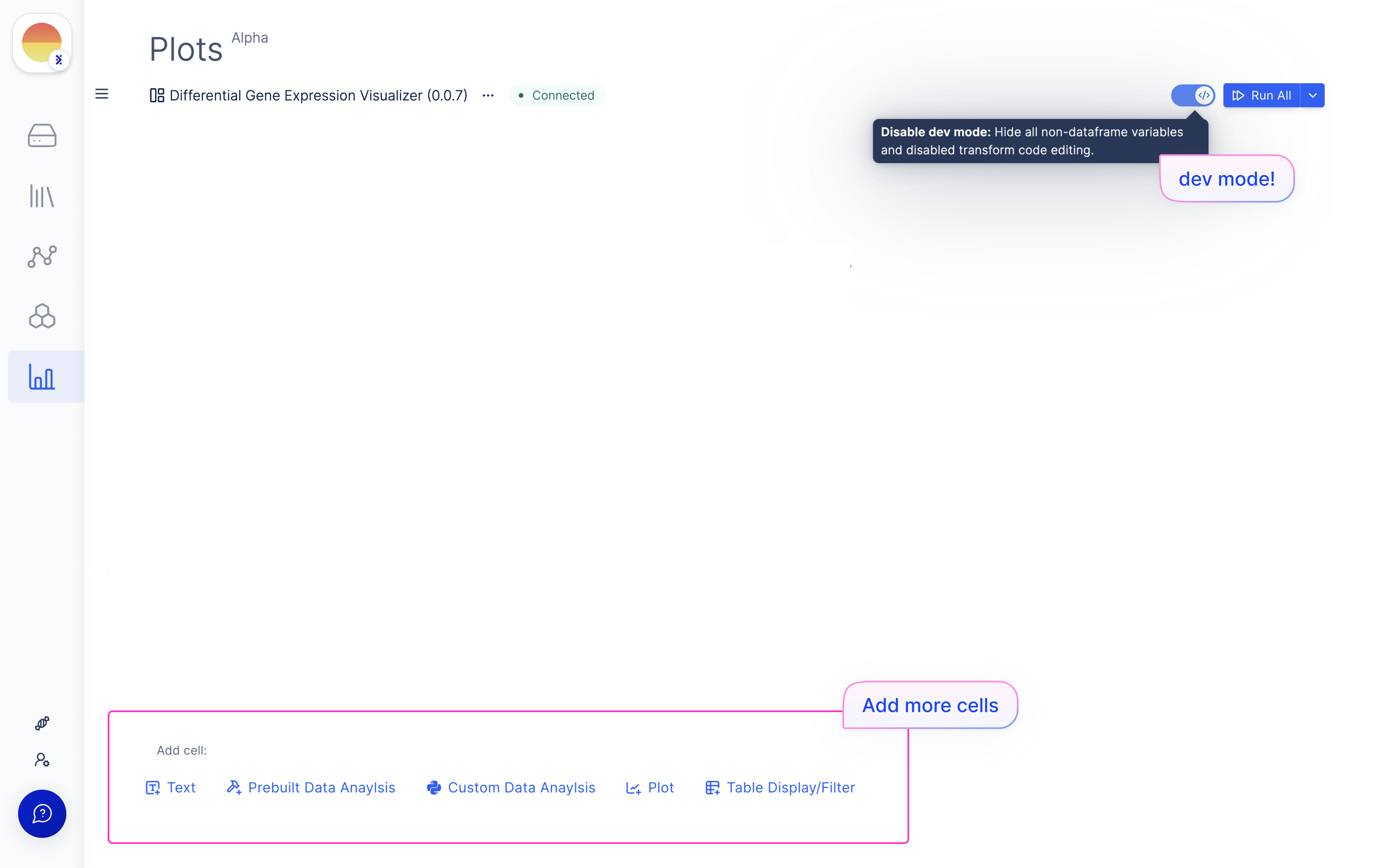
  <Step title="If needed, turn on ‘Dev Mode’ in the top right and add more plots or code blocks <Redirect to Plots Wiki>.">
    <Note>Click on the (x) for strandedness in most cases - only use strandedness if you have an nf-core specific strandedness column in your metadata.</Note>

    <img src="https://mintcdn.com/latchbio/LdV6VvwVO8ylN7Bn/images/bulk-rna-seq-quant/bulkrna25.png?fit=max&auto=format&n=LdV6VvwVO8ylN7Bn&q=85&s=4f4e8ef62d1cd8df38bb0d19c3c7e125" className="w-full border-slate-100 border rounded-md" width="5184" height="3240" data-path="images/bulk-rna-seq-quant/bulkrna25.png" />
  </Step>
</Steps>

## Pathway Enrichment

### Launch ‘Pathway Enrichment Analysis’ Latch Workflow

<Steps>
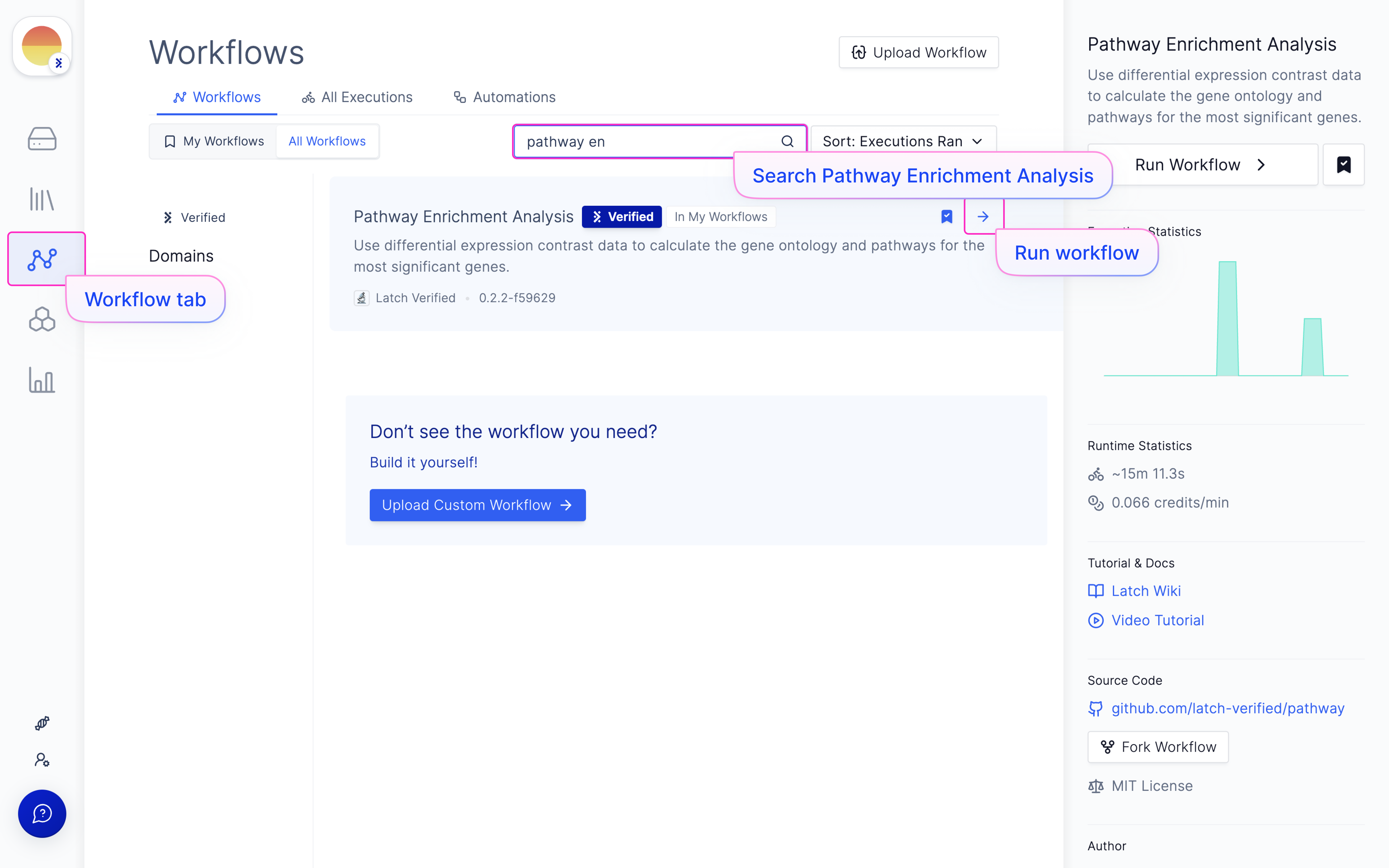
  <Step title="Navigate to the Latch Workflows tab on the left panel.">
    Choose the ‘Pathway Enrichment Analysis’ workflow in ‘All Workflows’ or My Workflows’ (if you have added it).

    <img src="https://mintcdn.com/latchbio/LdV6VvwVO8ylN7Bn/images/bulk-rna-seq-quant/bulkrna26.png?fit=max&auto=format&n=LdV6VvwVO8ylN7Bn&q=85&s=6a6ce3f9f7b238bf32b8c61a0e54a417" className="w-full border-slate-100 border rounded-md" width="5184" height="3240" data-path="images/bulk-rna-seq-quant/bulkrna26.png" />
  </Step>

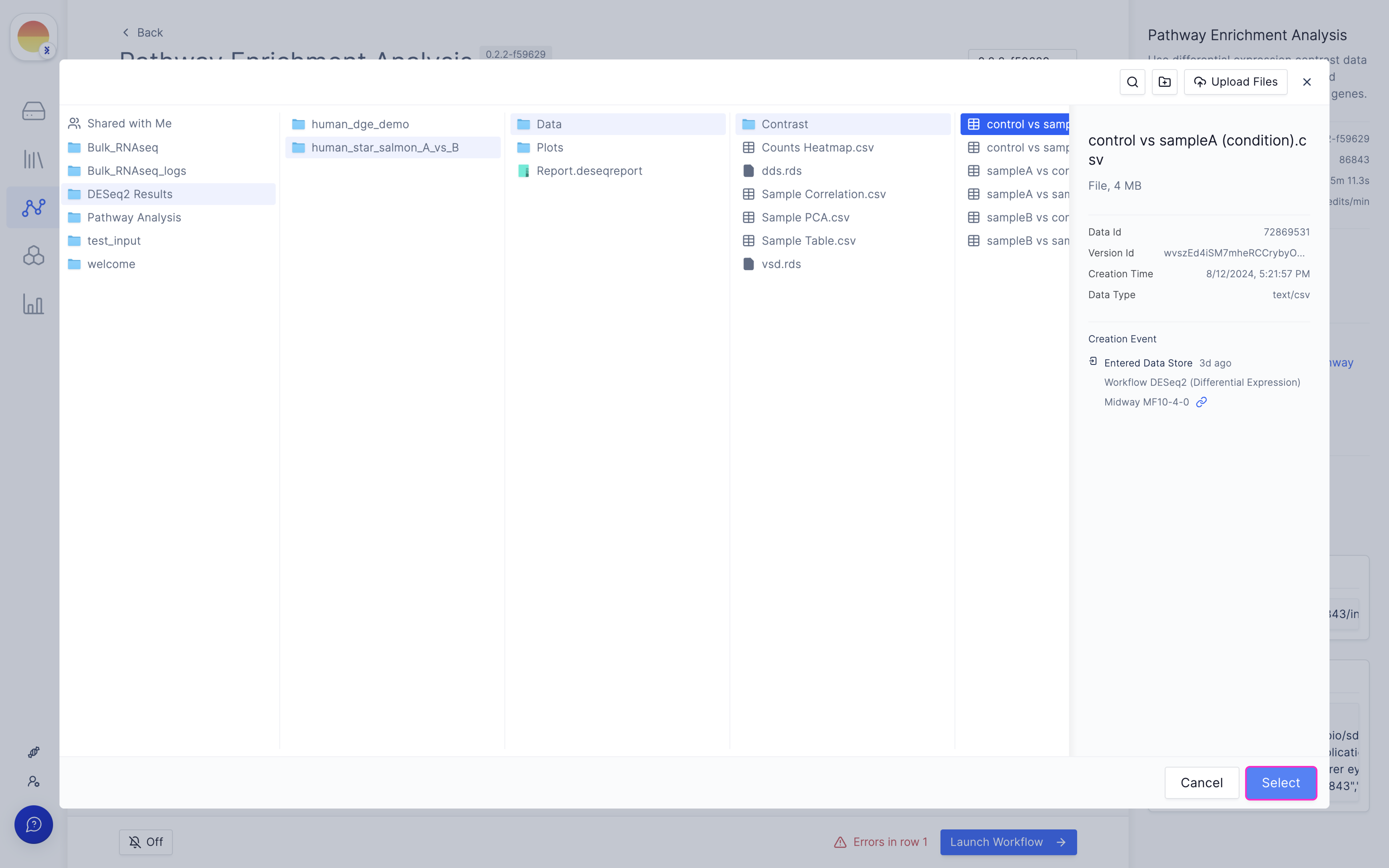
  <Step title="Choose your needed contrast file from the DESeq2 run output.">
    Each run will have a ‘Data/Contrast’ folder with a file for every comparison created in DESeq2.

    <img src="https://mintcdn.com/latchbio/LdV6VvwVO8ylN7Bn/images/bulk-rna-seq-quant/bulkrna27.png?fit=max&auto=format&n=LdV6VvwVO8ylN7Bn&q=85&s=1da5d4e2366e2dfee9f799bbc03086bd" className="w-full border-slate-100 border rounded-md" width="5184" height="3240" data-path="images/bulk-rna-seq-quant/bulkrna27.png" />
  </Step>

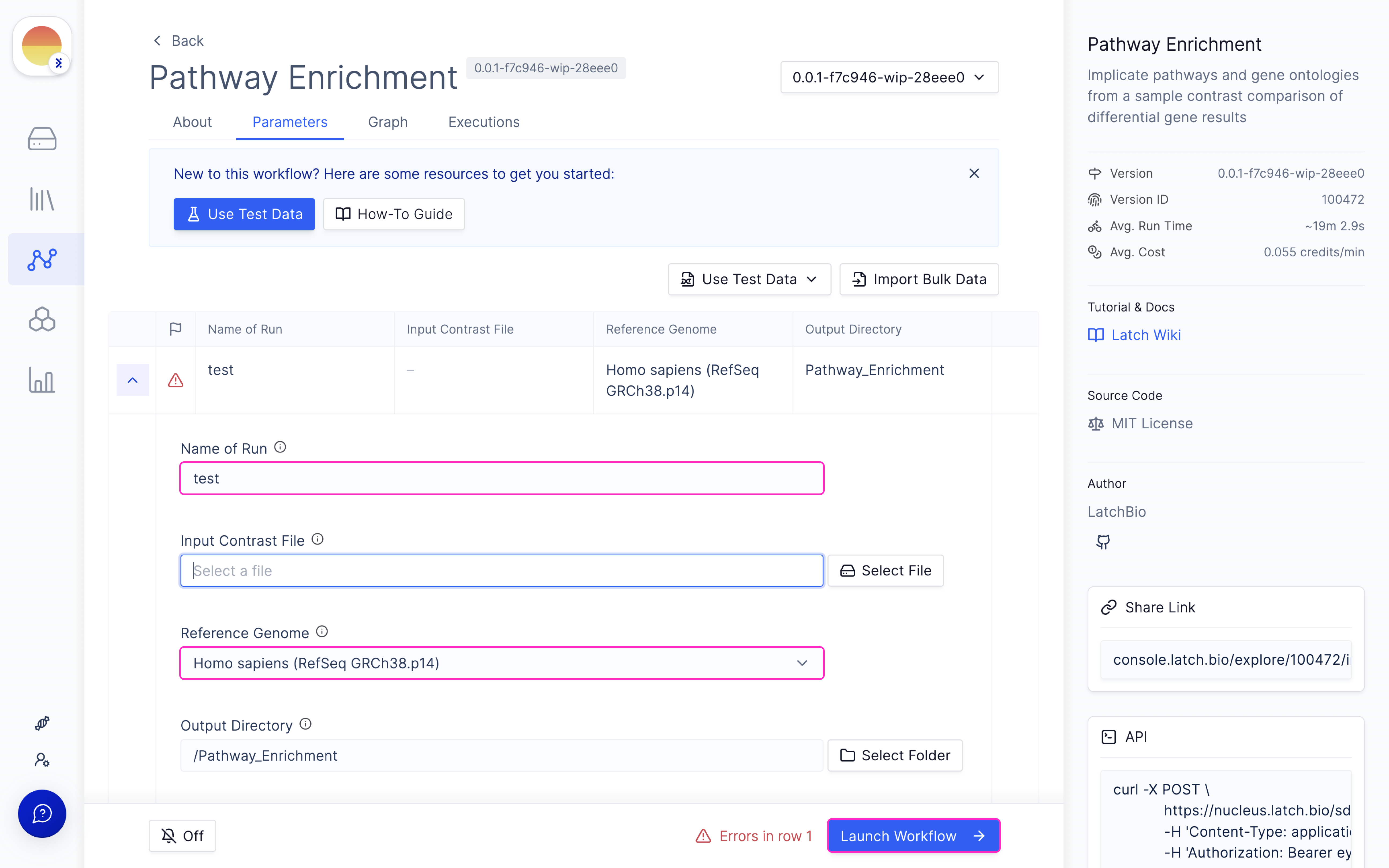
  <Step title="Choose your ‘Species’ and ‘Run Name’ and hit ‘Launch Workflow’.">
    <img src="https://mintcdn.com/latchbio/LdV6VvwVO8ylN7Bn/images/bulk-rna-seq-quant/bulkrna28.png?fit=max&auto=format&n=LdV6VvwVO8ylN7Bn&q=85&s=96b29591866713a3d478eb98111cda44" className="w-full border-slate-100 border rounded-md" width="5184" height="3240" data-path="images/bulk-rna-seq-quant/bulkrna28.png" />
  </Step>

  <Step title="	Useful outputs are the final ‘Report.html’ generated.">
    <iframe width="560" height="315" src="https://www.youtube.com/embed/-z7Zb06EM_Y" frameborder="0" allow="accelerometer; autoplay; clipboard-write; encrypted-media; gyroscope; picture-in-picture" allowfullscreen />
  </Step>
</Steps>

<br />

<br />

<Card
  title="Bulk RNA-seq Overview"
  href="/workflows/bulk-rna-seq-deep-dive"
  icon={<svg width="24" height="24" viewBox="0 0 24 24" fill="none" xmlns="http://www.w3.org/2000/svg">
<path fill-rule="evenodd" clip-rule="evenodd" d="M15.7433 2.66893C16.1128 2.2584 16.0795 1.62611 15.6689 1.25668C15.2584 0.887241 14.6261 0.920555 14.2567 1.33109C12.3062 3.49856 11.516 5.68827 11.2033 7.84985C11.1242 8.39645 11.5033 8.90365 12.0499 8.98271C12.4718 9.04374 12.8702 8.83183 13.0664 8.4806L13.2929 8.70711C13.6834 9.09763 14.3166 9.09763 14.7071 8.70711C15.0976 8.31658 15.0976 7.68342 14.7071 7.29289L13.7071 6.29289C13.6817 6.26746 13.6552 6.24369 13.6279 6.22158C13.7974 5.71485 14.0132 5.20898 14.2886 4.7028L16.2929 6.70711C16.6834 7.09763 17.3166 7.09763 17.7071 6.70711C18.0976 6.31658 18.0976 5.68342 17.7071 5.29289L15.437 3.02275C15.5351 2.9049 15.6371 2.78697 15.7433 2.66893ZM22.7433 8.33106C23.1128 8.74158 23.0795 9.37387 22.669 9.74332C19.0499 13.0003 15.3804 13.0001 12.0619 13L12 13C10.7696 13 9.58797 13.0028 8.43455 13.1435C8.57049 13.5004 8.49468 13.9195 8.20711 14.2071C7.81659 14.5976 7.18342 14.5976 6.7929 14.2071L6.21542 13.6296C5.70875 13.7993 5.20506 14.0148 4.70249 14.2883L4.70711 14.2929C5.09764 14.6834 5.09764 15.3166 4.70711 15.7071C4.31659 16.0976 3.68343 16.0976 3.2929 15.7071L3.02272 15.4369C2.90486 15.5351 2.78695 15.6371 2.66895 15.7433C2.25844 16.1128 1.62615 16.0795 1.2567 15.669C0.887249 15.2584 0.920543 14.6261 1.33106 14.2567C4.95008 10.9997 8.61965 10.9999 11.9381 11L12 11C13.2304 11 14.412 10.9972 15.5655 10.8565C15.4295 10.4996 15.5053 10.0805 15.7929 9.79289C16.1834 9.40237 16.8166 9.40237 17.2071 9.79289L17.7846 10.3704C18.2913 10.2007 18.795 9.98524 19.2975 9.71174L19.2929 9.70711C18.9024 9.31658 18.9024 8.68342 19.2929 8.29289C19.6834 7.90237 20.3166 7.90237 20.7071 8.29289L20.9773 8.56308C21.0952 8.46496 21.2131 8.36288 21.3311 8.2567C21.7416 7.88725 22.3739 7.92054 22.7433 8.33106ZM11.9502 15.0173C12.4968 15.0964 12.8758 15.6036 12.7967 16.1502C12.484 18.3117 11.6938 20.5014 9.74334 22.6689C9.3739 23.0795 8.74162 23.1128 8.33109 22.7433C7.92055 22.3739 7.88724 21.7416 8.25668 21.3311C8.3629 21.213 8.46497 21.0951 8.56305 20.9773L6.2929 18.7071C5.90238 18.3166 5.90238 17.6834 6.2929 17.2929C6.68342 16.9024 7.31659 16.9024 7.70711 17.2929L9.71142 19.2972C9.98574 18.793 10.201 18.2891 10.3702 17.7844L9.2929 16.7071C8.90238 16.3166 8.90238 15.6834 9.2929 15.2929C9.68342 14.9024 10.3166 14.9024 10.7071 15.2929L10.9336 15.5194C11.1298 15.1682 11.5282 14.9563 11.9502 15.0173ZM2.50001 5C2.50001 3.34315 3.84315 2 5.50001 2H9.50001C10.0523 2 10.5 2.44772 10.5 3C10.5 3.55228 10.0523 4 9.50001 4H5.50001C4.94772 4 4.50001 4.44772 4.50001 5V9.5C4.50001 10.0523 4.05229 10.5 3.50001 10.5C2.94772 10.5 2.50001 10.0523 2.50001 9.5V5ZM19 22C20.6569 22 22 20.6569 22 19V14.5C22 13.9477 21.5523 13.5 21 13.5C20.4477 13.5 20 13.9477 20 14.5V19C20 19.5523 19.5523 20 19 20H14.5C13.9477 20 13.5 20.4477 13.5 21C13.5 21.5523 13.9477 22 14.5 22H19Z" fill="#4B7AF9"/>
</svg>
}
  color="42C698"
>
  For a detailed overview of how Bulk-RNA Seq works, read our article.
</Card>