> ## Documentation Index
> Fetch the complete documentation index at: https://wiki.latch.bio/llms.txt
> Use this file to discover all available pages before exploring further.
# What is Latch Registry?
> Connect your sample sheets, metadata, and analysis — all in one place.
Latch Registry is a flexible sample management system for cross-functional wet and dry lab teams. Through a familiar spreadsheet interface, scientists can link sequencing files to contextual metadata collected in a lab. Computational biologists can easily bring samples and metadata into bioinformatics workflows on Latch.
## Get Started
Learn about projects, tables, and how to use them.
Add records manually, link files, import CSVs, or sync data from Benchling.
Define relationships between records from different tables.
Use our Python framework to upload custom bioinformatics pipelines for an auto generated user interface on Latch.
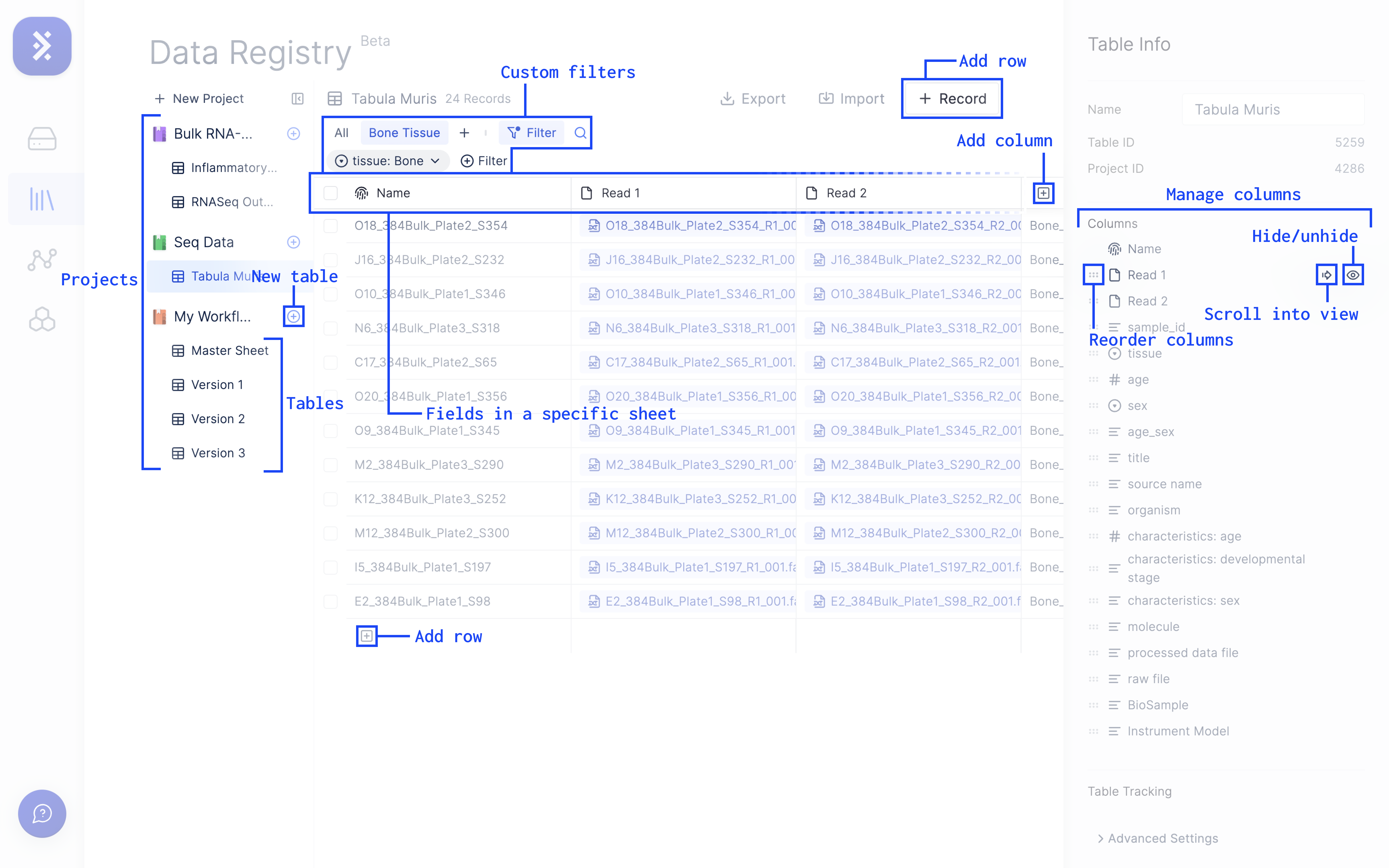
## The Anatomy of Latch Registry
The Registry consists of Projects and Tables which can be edited, filtered, and nagivated.
## Who is Latch Registry for?
Latch Registry is the source of truth that enables reliable, reproducible, and shareable computational analysis that is accessible to everyone on the team – from biologists, to bioinformaticians, to executives.
* An intuitive spreadsheet interface to input experimental metadata and autolink them with sequencing files.
* Effortless import of data in bulk via CSV file uploads.
* A streamlined process for searching and filtering bioinformatics results and sequencing files next to experimental metadata from the lab.
* Programmatic access to manipulate data in Registry.
* Batch execution of Registry samples through bioinformatics workflows.
* Automatic population of workflow outputs into Registry.
* A single place to track all your files, metadata, and analyses, so that you never incorrectly enter information or lose files again.
* Quickly search and filter top candidates for a drug discovery campaign, and audit past decisions with ease.
 ## Who is Latch Registry for?
Latch Registry is the source of truth that enables reliable, reproducible, and shareable computational analysis that is accessible to everyone on the team – from biologists, to bioinformaticians, to executives.
## Who is Latch Registry for?
Latch Registry is the source of truth that enables reliable, reproducible, and shareable computational analysis that is accessible to everyone on the team – from biologists, to bioinformaticians, to executives.